A Practical Guide to Building a WordPress Website with Elementor AI

The content walks through a modern, practical approach to creating a professional WordPress website by combining Elementor AI with ZipWP. The central idea is that a fully functional website can be produced very quickly, while still remaining flexible and easy to refine after launch.

The process begins with selecting a solid technical foundation. Before any design work starts, a domain name and reliable hosting are required. The guide points to Hostinger’s Business plan as a suitable option because of its fast NVMe-based storage, built-in security features such as SSL, and domain privacy that keeps personal contact details protected. From a budgeting perspective, the setup is positioned as accessible, offering a free domain and optional discounts to reduce initial costs.

Once hosting is ready, WordPress is installed and prepared for use. Rather than building on top of default content, the approach encourages starting with a clean workspace. This includes removing sample posts, pages, and unused plugins so the dashboard stays simple and efficient. Early optimizations are also applied, such as using readable URLs and ensuring the site runs on HTTPS to improve security and credibility.

At the core of the workflow is AI-assisted website creation. Using the ZipWP builder through the Starter Templates plugin, users describe their website in plain language—its purpose, audience, and offerings. AI then refines this input into clearer, more professional text and uses it to generate layouts and structure. Images can be selected from royalty-free libraries or uploaded manually, with careful file naming recommended to support better search visibility.

After the initial site is generated, further refinement happens through Elementor together with the Astra theme. Astra provides the overall layout framework, while Elementor allows full visual control over pages. Global style settings make it possible to update colors, typography, and button styles across the entire site at once. Additional design options—such as fixed background effects, decorative section dividers, and mobile-specific layout adjustments—help enhance the look and feel without writing custom code.

For projects that go beyond a basic website, the content also mentions optional enhancements. One example is integrating an online booking system so visitors can schedule services directly on the site. For larger teams or more advanced needs, a paid version of the AI builder is referenced, offering collaboration features and deeper control over site structure.

Overall, the focus is on speed, clarity, and long-term usability. AI is positioned as a way to accelerate the first version of a website, while WordPress and Elementor provide the tools needed to shape, expand, and maintain it over time.

AI-Enhanced Websites

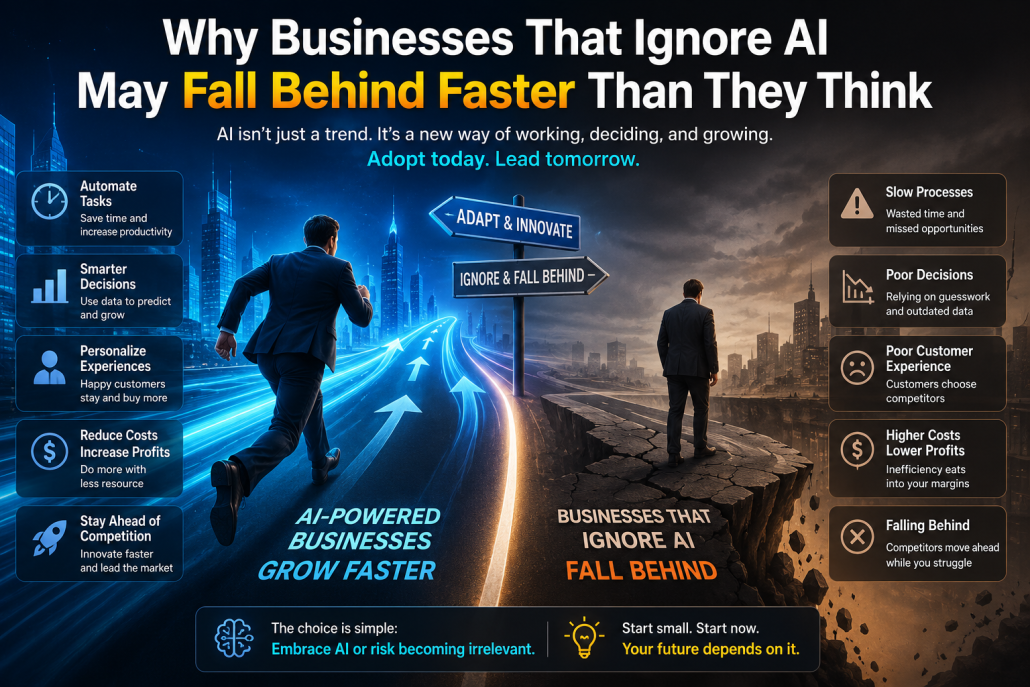
AI can be very useful on websites when used with intention, but it’s not a magic solution.

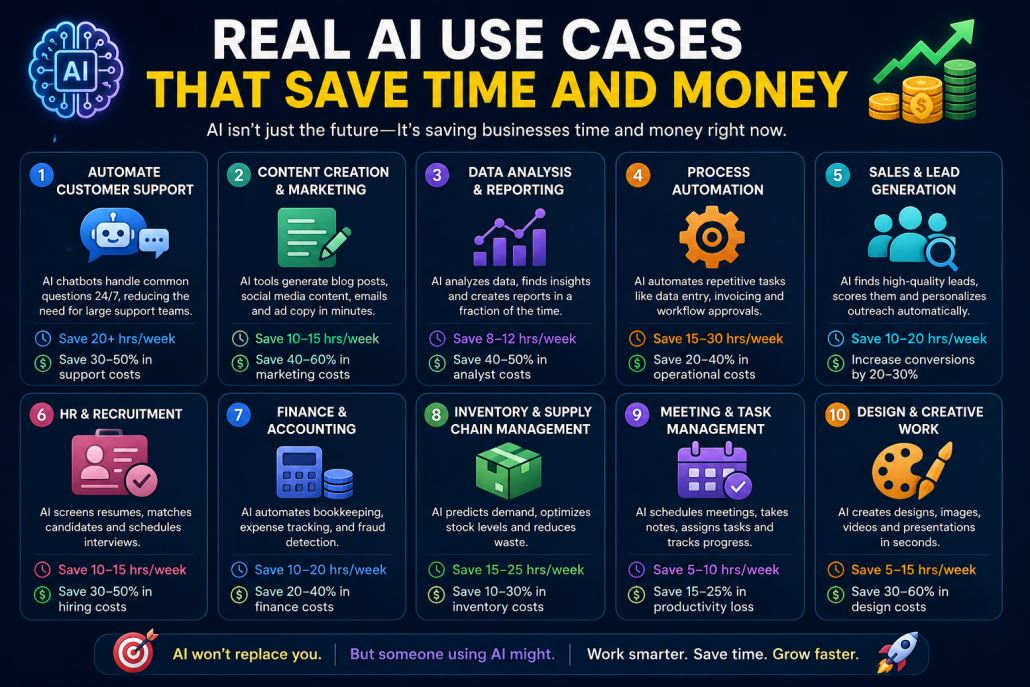
On the positive side, AI improves user experience by offering instant help, supports faster content creation, automates repetitive tasks, assists with SEO basics, and enables simple personalization for different visitors. This can save time, reduce workload, and make a website feel more responsive and modern.

On the downside, AI can produce generic content if not guided properly, feel cold or robotic when overused, raise privacy and data concerns, and require ongoing monitoring and refinement. Relying too heavily on AI can also weaken human judgment and brand authenticity.

In short, AI works best as a supportive tool—used selectively to reduce friction and enhance the experience, not to replace human thinking or connection.

App Monetization

 Backend & Data

MongoDB for App Developers

From Commands to Scalable App Backends

Today, modern applications are no longer simple systems with fixed

requirements. Mobile apps, web platforms, and SaaS products evolve

constantly. New features are added, user behavior changes, and data

models grow more complex over time. In this environment, backend

technology must support speed, flexibility, and scale. This is where

MongoDB and NoSQL databases play a key role.

MongoDB represents a document-based, NoSQL approach to data

management. Instead of rigid tables and predefined schemas, data is

stored in flexible documents that closely match how applications

actually work. Users, orders, settings, logs, and nested objects can live

together naturally. For developers, this reduces friction between

application code and the database, making systems easier to build,

understand, and maintain.

One of the biggest advantages of MongoDB for app backends is adaptability. In real projects, requirements rarely stay fixed. New f

ields are added, structures evolve, and business logic changes. With

traditional SQL databases, these changes often require schema

migrations, table redesigns, and careful coordination. MongoDB

allows teams to evolve their data model gradually, without blocking

development or slowing down iteration.

Scalability is another critical factor. Modern applications must handle

growth—sometimes predictably, sometimes suddenly. NoSQL

databases like MongoDB are designed to scale horizontally, fitting

naturally into cloud-native architectures and distributed systems. This

makes them well suited for applications that serve global users, handle

high traffic, or rely on micro-services.

The MongoDB shell, highlighted in this guide, reflects a very practical

developer workflow. It allows direct interaction with the database—

inspecting collections, testing queries, and debugging data issues in

real time. This hands-on access is especially valuable during

development, troubleshooting, and performance tuning. It keeps

developers close to their data and speeds up problem-solving.

This does not mean SQL databases are obsolete. Relational databases

remain an excellent choice for systems with strict schemas, complex

transactions, or strong consistency requirements, such as financial or

accounting systems. The real question is not SQL versus NoSQL, but

which tool fits the problem best. For many app-driven products,

MongoDB aligns more naturally with modern development practices.

In conclusion, MongoDB offers a backend foundation that grows with

the application. It supports rapid iteration, flexible data models, and

scalable architectures—all while keeping the developer experience

simple and efficient. For app developers building real products in real

environments, this approach turns the database from a bottleneck into

an enabler.

Building a Scalable WordPress Marketing Website: Design, Sales, and Monetization

When building a WordPress marketing website, the

goal is usually to keep things simple while still leaving

room for growth, analytics, and monetization. A

popular choice for this kind of setup is Enfold.

Although Enfold is technically a theme, it behaves like

a full framework and is widely used for business and

commercial websites. It offers built-in layout tools,

performance optimizations, and strong compatibility

with analytics and e-commerce features. For many

companies, Enfold makes it easier to present products,

highlight qualifications, and structure content clearly

without relying on dozens of extra plugins.

For payments and online selling, WooCommerce is the

standard solution. It allows businesses to sell products

or services, manage orders, and handle payments

directly inside WordPress. WooCommerce works

smoothly with Enfold and can also be combined with

Elementor to simplify page building. Elementor’s

visual drag-and-drop editor makes designing product

pages, landing pages, and comparison sections much

easier, especially for non-technical teams. Together,

WooCommerce and Elementor reduce development

friction and make ongoing updates faster and more

manageable.

On the monetization side, many websites also rely on

advertising. Google AdSense is commonly used on

content-driven pages to generate passive revenue

through display ads, particularly in blogs and

informational sections. For mobile apps connected to

the same business or brand, Google AdMob serves a

similar purpose by enabling in-app advertising and

monetization. While ads are not always suitable for

purely corporate or product-focused pages, they can be

effective when used carefully in educational or high-

traffic areas.

An important but often overlooked step in this setup is

organizing navigation through the menu system. By

going to Appearance → Menus in WordPress, you

can manually add Posts (such as blog categories or

specific articles) to the main menu structure alongside

Pages like Products or Services. This helps visitors

easily discover content, improves internal linking for

SEO, and creates a clearer user journey between

informational posts and commercial pages. For

marketing websites, adding Posts to the menu ensures

that valuable content supports product pages instead of

being hidden away.

Overall, this combination—Enfold for structure,

WooCommerce for payments, Elementor for ease of

design, AdSense or AdMob for monetization, and a

well-organized menu structure—creates a flexible

WordPress ecosystem. It allows businesses to present

products professionally, guide users through content,

manage commerce efficiently, analyze performance,

and scale their digital presence without

overcomplicating the system.

AI Analytics & Decision Support

This image illustrates how AI is becoming an active

partner in modern business decision-making rather

than just a background technology. The central figure

—a human-like robot—symbolizes AI as an intelligent

assistant, standing beside a digital workspace and

interacting directly with data and systems. Its gesture

toward the “AI” chip highlights the role of machine

intelligence at the core of today’s analytical and

operational tools.

The dark, futuristic color palette and clean design

reinforce a sense of trust, precision, and forward

thinking. Visual elements like the processor icon and

gear suggest the combination of data processing and

operational execution—showing that AI does not stop

at analysis, but continues into action. The workspace in

front of the AI figure represents real business

environments where decisions are made daily, from

strategy and planning to operations and optimization.

The headline text emphasizes impact rather than

theory. It positions AI as a force that is actively

shaping the future of business decisions, not replacing

humans, but enhancing how decisions are informed,

evaluated, and executed. The overall composition

communicates clarity, control, and confidence,

suggesting that AI helps organizations move from

uncertainty to insight and from intuition to evidence-

based decision-making.

As a whole, the image conveys a clear message: AI is

no longer optional or experimental. It is becoming a

core decision-support layer that empowers businesses

to act faster, smarter, and with greater confidence in an

increasingly complex world.

Building AI Workflows with Forms, Email, and CRM

Building AI workflows with forms, email, and CRM is

about connecting the tools businesses already use into

a single, intelligent flow that runs smoothly in the

background. In many organizations, these systems

exist side by side but are not truly connected. A form

submission arrives in an inbox, someone reads it,

copies the details into a CRM, sends a reply, and

maybe creates a follow-up task. Each step is simple,

but together they consume time, introduce delays, and

leave room for errors. AI workflows are designed to

remove this manual glue work and replace it with a

process that is fast, consistent, and reliable.

At the heart of these workflows is the form, which acts

as the entry point for customers, leads, or internal

requests. AI can analyze form submissions the moment

they arrive, understand the intent behind the input, and

extract the information that actually matters. Instead of

treating every submission the same way, the system

can classify requests, detect urgency, and identify

missing or unclear details. This allows the workflow to

respond appropriately, whether that means triggering

an automatic email, creating a CRM record, or routing

the request to the right team.

Email plays a key role as the communication layer.

With AI in place, emails no longer have to be generic

or manually written. Responses can be tailored based

on the content of the form, the customer’s history, or

the stage of the relationship stored in the CRM. AI can

draft clear, context-aware messages, choose the right

tone, and send them at the right moment. It can also

monitor incoming replies, understand their meaning,

and decide whether to continue the automated flow or

hand the conversation over to a human.

The CRM acts as the system of record, bringing

structure and visibility to the entire process. AI

workflows ensure that every interaction is logged

automatically and consistently. Contact details,

conversation history, and next actions are updated

without manual input, keeping the CRM accurate and

useful. Over time, AI can also analyze this data to

identify patterns, such as which types of inquiries

convert best, where follow-ups are delayed, or which

messages lead to faster responses.

One of the biggest advantages of combining AI with

forms, email, and CRM is that the workflow becomes

adaptive. As the system processes more interactions, it

can improve how requests are categorized, how emails

are phrased, and how tasks are prioritized. This makes

the workflow more effective without requiring constant

manual tuning. Teams spend less time managing

processes and more time acting on meaningful

information.

Ultimately, building AI workflows around forms,

email, and CRM is not about adding complexity. It is

about creating a seamless experience for both

customers and teams. The right information reaches the

right place at the right time, communication feels

timely and relevant, and the business operates more

smoothly. When done well, these workflows are almost

invisible, yet they quietly remove friction, improve

efficiency, and support better relationships at scale.

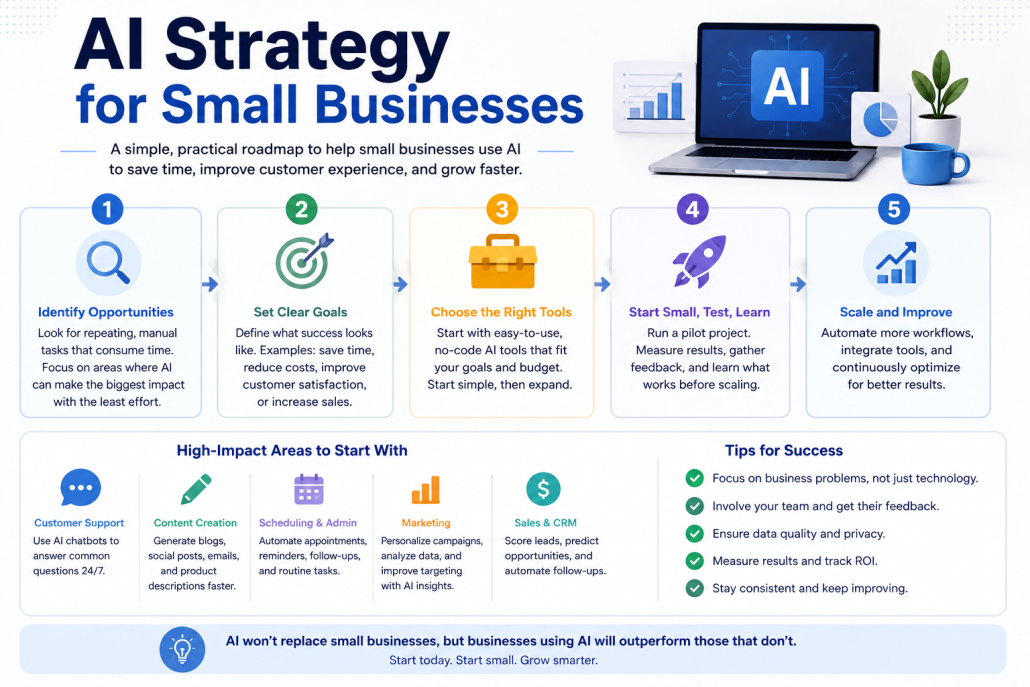
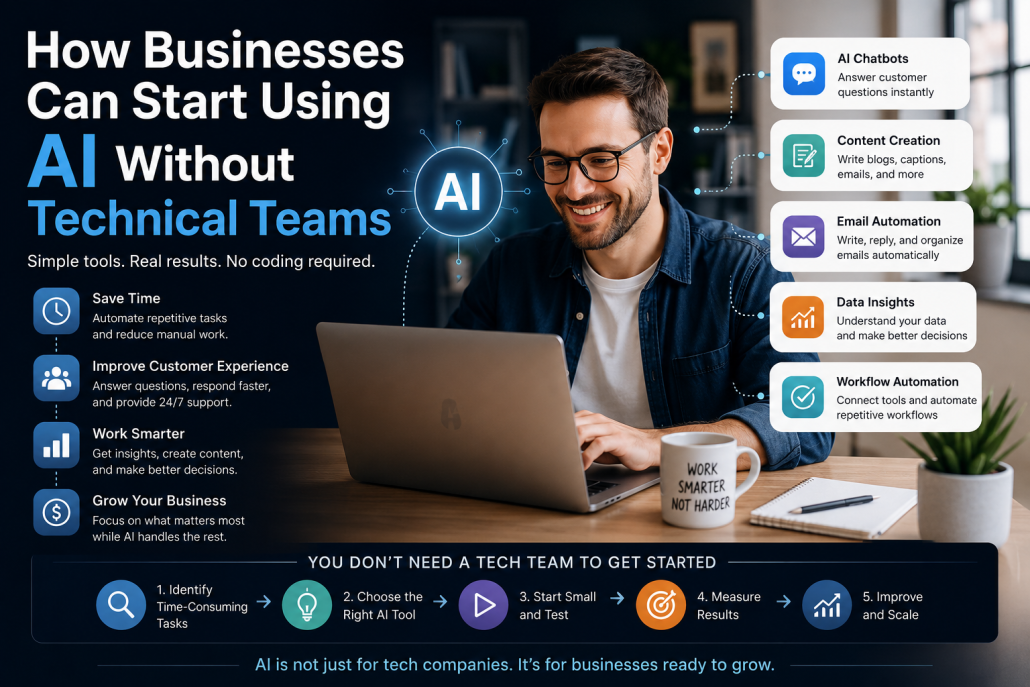
AI Automation for Businesses: Reducing Manual Work

AI automation is becoming one of the most practical

ways businesses can reduce manual work without

disrupting how their teams already operate. In many

organizations, valuable time is still spent on repetitive

tasks such as copying data between systems,

responding to routine emails, updating records, or

coordinating internal processes. These tasks are

necessary, but they rarely create real value. AI

automation focuses on removing this friction so people

can concentrate on work that actually requires human

judgment, creativity, and decision-making.

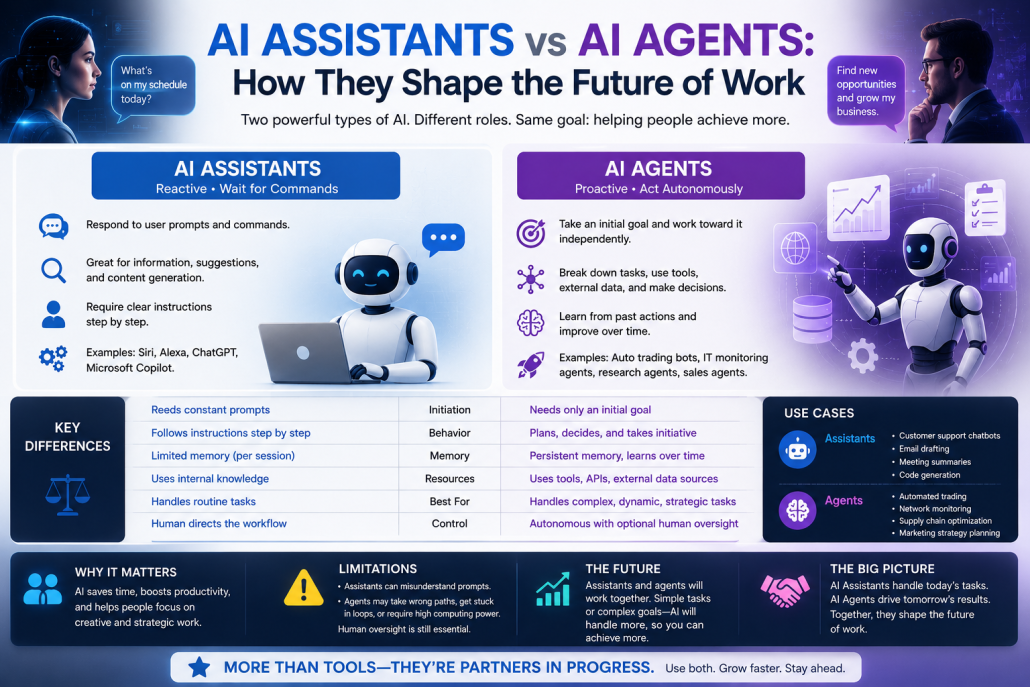
Unlike traditional automation, which relies on rigid

rules and fixed sequences, AI-driven automation can

adapt to variation. It can understand context, recognize

patterns, and handle inputs that are not always

structured or predictable. This makes it especially

useful for everyday business workflows that involve

forms, messages, documents, and user interactions. For

example, when a customer fills out a form on a

website, AI can automatically classify the request,

extract the relevant information, and route it to the

right system or person—without manual sorting or

copy-pasting. Over time, the system learns which

actions lead to faster resolutions and better outcomes.

One of the key benefits of AI automation is

consistency. Manual processes are prone to delays,

errors, and inconsistencies, especially as teams grow or

workloads fluctuate. AI-driven workflows operate the

same way every time, at any hour, and without fatigue.

This reduces mistakes, improves response times, and

creates a more predictable experience for customers

and internal teams alike. A sales inquiry, for instance,

can be processed immediately, logged in a CRM, and

followed up with the right message—without waiting

for someone to notice it in an inbox.

Another important advantage is scalability. As a

business grows, manual processes often become

bottlenecks. Hiring more people to handle repetitive

tasks increases costs and complexity. AI automation

allows companies to scale operations without scaling

manual effort at the same rate. Whether it is processing

ten requests or ten thousand, the workflow remains

stable. This is particularly valuable for small and mid-

sized businesses that need to operate efficiently with

limited resources.

AI automation also improves visibility and decision-

making. Automated workflows generate structured data

about how processes run, where delays occur, and

which steps require the most intervention. This insight

helps businesses identify inefficiencies and

continuously refine their operations. Instead of

guessing where time is being lost, teams can rely on

real data to optimize workflows and improve

performance.

Most importantly, reducing manual work does not

mean removing people from the process. It means

supporting them. AI automation takes care of

repetitive, low-value tasks so teams can focus on

higher-level work—building relationships, solving

complex problems, and making informed decisions.

When implemented thoughtfully, AI automation

becomes a quiet assistant in the background, making

businesses faster, more reliable, and easier to run

without adding unnecessary complexity.

Automation & Workflows