A website-ready making-of: the programs on the Mac, the Python agent, the product catalog page, and how that page is shown on i-9.ir with an iframe.
What you need on the Mac
I-9 Agent was written and tested on macOS with this toolkit. Nothing here is a WordPress plugin. WordPress only displays the finished page.
Program
Why it was used
Code editor
The editor where the agent, tools, and catalog page were written.
Python 3.13
The language the agent and catalog server run in. A virtualenv (.venv) keeps packages isolated.
Terminal / zsh
Runs adk web for chat, python -m i9_agent.catalog_ui for the list, and gcloud for deploy.
Git
Version control for the I9_Agent project.
Homebrew
Installs extra Mac tools, including the Google Cloud SDK.
Google Cloud SDK (gcloud)
Puts the catalog on Cloud Run so customers can open it, not only localhost.
Accounts and keys (not programs)
A Gemini API key in .env as GOOGLE_API_KEY — for chat.
A Google Cloud project with billing — for hosting. Use a real project such as i9-agent, not Default Gemini Project.
Optional: Telegram bot token — only if the agent should notify an operator.
The I-9 product JSON (or the live shop API) — the agent must not invent products.
Docker Desktop was not required on this Mac. Cloud Run built the container on Google’s side from the project Dockerfile.
What I-9 Agent is
I-9 Agent is the official product assistant for I-9 Group (آیناین). It answers only from the store list. Chat stays short. The full match list loads on a dark RTL catalog page: search, photos, WhatsApp, price, and a link to i-9.ir.
Chat
Google ADK + Gemini
adk web runs the agent locally. Tools: search_i9_products (required before any product answer) and notify_me (Telegram).
Catalog page
Python server + HTML
catalog.html loads 20 products at a time from /api/catalog/search. Photos come from /api/catalog/thumb, fetched from the real i-9.ir product.
How a request moves
Visitor
Opens chat, or opens the catalog (direct link or WordPress iframe).
Agent
Calls search_i9_products once. Does not dump 1,800 rows into the chat. Sends the catalog URL.
Catalog UI
Same query, pages of 20, until the list is complete. Cards show image, WhatsApp, category, price, product link.
i-9.ir
The real shop. Product links and photos belong here. WordPress does not run the Python agent.
How it was built
1. Mac workspace. Install a code editor, Python 3.13, Git, Homebrew, then Google Cloud SDK. Create a virtualenv and install google-adk, requests, and python-dotenv.
2. Agent in the editor. Write i9_agent/agent.py as an ADK agent with a strict catalog-only policy: no invented products, Persian in / English out matching the user, budget taken from the number the user typed.
3. Product search tool.tools.py exposes search_i9_products. i9_api.py reads the I-9 API or local I9_db.json, returns one page of 20, plus total matches and a catalog URL.
4. Catalog page. Chat cannot show 1,898 pumps. catalog_ui.py serves catalog.html: RTL layout, search, infinite load, WhatsApp, product link. Run locally with:cd /Users/kiamalek/Agents/I9_Agent source .venv/bin/activate python -m i9_agent.catalog_uiThen open http://127.0.0.1:8787.
5. Chat on the Mac. For the AI box itself:cd /Users/kiamalek/Agents/I9_Agent source .venv/bin/activate set -a && source .env && set +a adk web .That local ADK UI is not the WordPress Kia plugin. Same idea (a chat box), different program.
6. Host on Google Cloud, not WordPress. WordPress cannot run this Python server. A Cloud Run service (i9-catalog in project i9-agent) serves the page to the internet. Default Gemini Project is only for Gemini credits; it cannot host Cloud Run.
7. Show it on the website. i-9.ir keeps the shop. A WordPress page iframes the Cloud URL (see below). The Kia-style AI Engine plugin can stay a chat widget; it should link to this list, not try to draw the cards itself.
Publish, then add that page to the menu. Do not upload catalog.html into the theme. The iframe src must stay the Cloud URL so search and photos keep working.
Project map
Path
Role
i9_agent/agent.py
Gemini instructions and tools
i9_agent/tools.py
Product search + Telegram notify
i9_agent/i9_api.py
Catalog pages of 20 from API or JSON
i9_agent/catalog_ui.py
HTTP server for the list and thumbnails
i9_agent/static/catalog.html
The dark RTL product UI
Dockerfile + entrypoint.sh
What Cloud Run runs
https://kiaapp.xyz/wp-content/uploads/2025/09/favicon2-4-300x200.png00Kiahttps://kiaapp.xyz/wp-content/uploads/2025/09/favicon2-4-300x200.pngKia2026-08-16 15:10:132026-09-17 20:43:59How we made I-9 Agent on a Mac
The current Google ADK Python CLI command tree includes api_server, conformance, create, deploy, eval, eval_set, migrate, optimize, run, test, and web. Your installed version may differ, so verify it locally with adk --help. Official ADK CLI reference
1. Display ADK help
adk --help
Shows every top-level command available in your installed ADK version.
For help with a specific command:
adk COMMAND --help
Example:
adk web --help
2. Display the installed ADK version
adk --version
Confirms which ADK CLI version is active.
3. Create a new agent project
adk create APP_NAME
Example:
adk create my_agent
Creates a new directory containing a prepopulated agent template.
This exposes agents through REST endpoints for connection to a website, mobile application, backend, or test client. By default, it runs at http://localhost:8000. ADK API Server documentation
It supports most of the server options available to adk web, including:
--host
--port
--allow_origins
--log_level
--reload
--reload_agents
--a2a
--url_prefix
--trigger_sources
--session_service_uri
--artifact_service_uri
--memory_service_uri
--trace_to_cloud
--otel_to_cloud
Deployment commands
7. Display deployment options
adk deploy --help
ADK currently provides deployment subcommands for:
Migrates session data into the latest database schema.
Setup commands related to ADK
These are package-management commands, not ADK subcommands.
Install Google ADK
pip install google-adk
Upgrade Google ADK
pip install --upgrade google-adk
Inspect the installed package
pip show google-adk
Confirm the executable location
which adk
Stop any running ADK server
Ctrl+C
Complete command tree
adk
├── api_server
├── conformance
│   ├── record
│   └── test
├── create
├── deploy
│   ├── agent_engine
│   ├── cloud_run
│   └── gke
├── eval
├── eval_set
│   ├── add_eval_case
│   ├── create
│   └── generate_eval_cases
├── migrate
│   └── session
├── optimize
├── run
├── test
└── web
For everyday development, the five most important commands are:
adk create my_agent
adk run my_agent
adk web .
adk api_server .
adk deploy cloud_run --project=PROJECT_ID --region=REGION my_agent
https://kiaapp.xyz/wp-content/uploads/2025/09/favicon2-4-300x200.png00Kiahttps://kiaapp.xyz/wp-content/uploads/2025/09/favicon2-4-300x200.pngKia2026-07-13 18:04:482026-09-17 18:00:18Complete Command Guide for ADK Web Development and Google Cloud Deployment
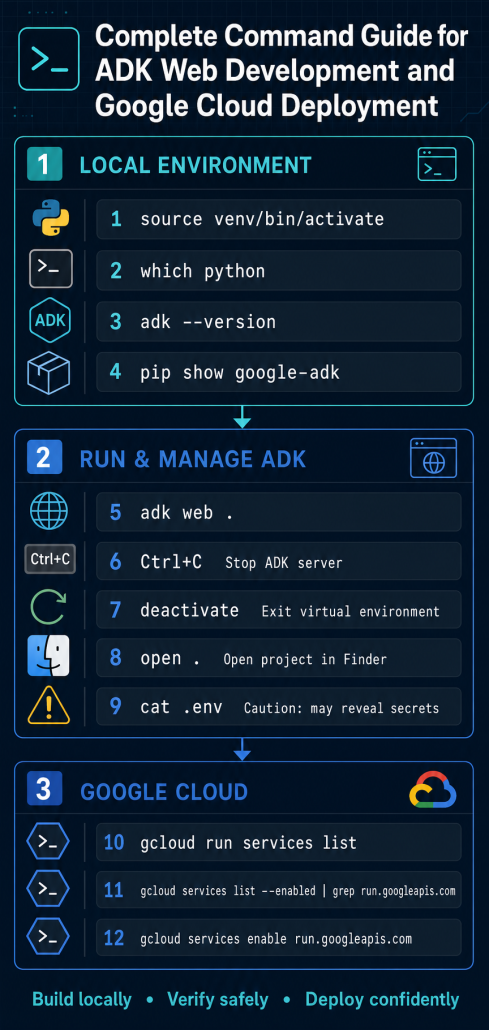
Description: Activates the project’s isolated Python environment, so Python and pip use project-specific packages.
Web-development usage: Prevents dependencies from differentPython web projects—such as Django, Flask, FastAPI, or ADK—from conflicting.
Confirm which Python installation is active:
which python
Description: Displays the filesystem path of the Python executable currently being used.
Web-development usage: Confirms that your terminal is using the project’s virtual-environment Python instead of the system Python.
Check the installed Google ADK version:
adk --version
Description: Prints the installed version of the Google Agent Development Kit command-line tool.
Web-development usage: Helps verify compatibility when developing an AI agent that will connect to a website or web application.
Display information about the installed ADK package:
pip show google-adk
Description: Shows the package version, installation location, dependencies, and other metadata.
Web-development usage: Useful for debugging missing packages, dependency conflicts, or differences between development and deployment environments.
Start the ADK web interface from the current project:
adk web .
Description: Starts ADK’s local development server and web interface using the project in the current directory.
Web-development usage: Lets you test and interact with an AI agent through a browser before connecting it to your production website.
Stop the running ADK server:
Ctrl+C
Description: Sends an interrupt signal to the active terminal process and stops the local server.
Web-development usage: Used to stop a development server before changing configuration, installing packages, or restarting the application.
Ctrl+C stops ADK, but it does not exit the virtual environment.
Exit the virtual environment:
deactivate
Description: Returns the terminal to the system’s default Python environment.
Web-development usage: Useful when you finish working on one Python web project and want to switch to another environment or project.
Open the current folder in macOS Finder:
open .
Description: Opens the terminal’s current directory in the macOS Finder application.
Web-development usage: Makes it convenient to inspect, move, or open project files with graphical applications and code editors.
Display the .env file:
cat .env
Description: Prints the contents of the project’s environment-variable file in the terminal.
Web-development usage: Helps inspect configuration values such as database addresses, API endpoints, secret keys, ports, and environment settings.
Be careful: .env may contain API keys and passwords. Never share its output, commit it to Git, or include it in screenshots.
A safer way to list only the variable names is:
sed 's/=.*$/=***HIDDEN***/' .env
List deployed Cloud Run services:
gcloud run services list
Description: Lists the Cloud Run services available in the active Google Cloud project.
Web-development usage: Helps locate deployed websites, APIs, backends, webhooks, and AI-agent services, along with their regions and URLs.
If necessary, specify the project and region:
gcloud run services list --project=YOUR_PROJECT_ID --region=YOUR_REGION
This is helpful when your local gcloud configuration points to a different project or default region.
Check whether the Cloud Run API is enabled:
gcloud services list --enabled | grep run.googleapis.com
Description: Lists enabled Google Cloud APIs and filters the results for the Cloud Run API.
Web-development usage: Cloud Run cannot deploy or manage a containerized web application until its required API is enabled.
If nothing is returned, enable it with:
gcloud services enable run.googleapis.com
This prepares the active Google Cloud project to deploy web applications, APIs, and agent services on Cloud Run.
https://kiaapp.xyz/wp-content/uploads/2025/09/favicon2-4-300x200.png00Kiahttps://kiaapp.xyz/wp-content/uploads/2025/09/favicon2-4-300x200.pngKia2026-07-13 15:50:522026-09-17 19:43:53Here is the command list with an additional explanation and its web-development usage:
Google Cloud CLI (gcloud) – Essential Commands for Beginners
What is gcloud?
gcloud is the Google Cloud Command Line Interface (CLI). It lets you manage your Google Cloud resources directly from the Terminal instead of using the web console.
You can use gcloud to:
Create and manage projects
Enable APIs
Deploy applications
Manage virtual machines
Work with Cloud Run
Configure billing
Create service accounts
Manage AI services such as Gemini
Numbered gcloud Commands
1. Check whether gcloud is installed
gcloud --version
Displays the installed Google Cloud SDK version.
2. Update gcloud
gcloud components update
Updates the Google Cloud SDK to the latest version.
3. Sign in
gcloud auth login
Opens your browser so you can sign in with your Google account.
4. List authenticated accounts
gcloud auth list
Shows every Google account currently authenticated.
OpenClaw and AI Agents: Powerful Automation with Powerful Responsibilities
AI agents are rapidly becoming one of the most exciting developments in artificial intelligence. Unlike traditional chatbots that simply answer questions, AI agents can actively perform tasks on your behalf. You can ask them to browse the web, organize files, execute terminal commands, call APIs, automate repetitive workflows, or even complete complex multi-step projects with very little supervision. It is almost like having a team of digital assistants available whenever you need them. One platform attracting significant attention is OpenClaw, an open-source framework that allows users to run AI agents directly on their own computers instead of relying entirely on cloud services. By making autonomous AI accessible to anyone with a laptop, OpenClaw is lowering the barrier to entry and enabling developers, businesses, and enthusiasts to experiment with powerful AI automation.
To understand why AI agents are so powerful, it helps to understand what they actually are. At their core, AI agents combine a large language model with external tools and a degree of autonomy. Rather than responding to a single prompt and stopping, they repeatedly observe their environment, decide on the next action, execute that action, evaluate the outcome, and continue working until the objective is complete. This continuous cycle of perception, decision-making, action, and learning makes AI agents capable of solving problems that would normally require many separate human interactions. However, this same capability also introduces new risks that do not exist with ordinary conversational AI.
The first source of risk is the AI model itself. Large language models are impressive, but they are not perfect. They sometimes generate false information, a phenomenon known as hallucination. The challenge is that these errors are often presented with complete confidence. When an AI agent bases its decisions on incorrect information, every action that follows may also be incorrect. The problem becomes even more serious if the data the model relies on has been manipulated. Attackers may poison external knowledge sources, modify stored memory, or inject misleading information that influences the agent’s decisions. Researchers have also demonstrated techniques that deliberately manipulate AI models through carefully crafted prompts, making them perform actions they were never intended to perform.
AI agents become even more capable—and more vulnerable—because they interact with external tools. Modern agent platforms frequently communicate with databases, web browsers, APIs, cloud services, and other software using technologies such as the Model Context Protocol (MCP). Every new integration expands the attack surface. If authentication tokens, API keys, or user credentials are passed to an untrusted service, sensitive information could be exposed. Likewise, third-party tools themselves may contain software bugs or intentionally malicious code. Since the AI agent often executes these tools automatically, a compromised plugin or extension may gain access to the same permissions as the agent itself.
Automation introduces another important challenge: speed. AI agents can perform thousands of actions in a very short period of time. While this makes them extremely productive, it also means that mistakes are amplified. A small error that a human might notice immediately can quickly spread across an entire workflow when repeated automatically. Without a human reviewing every decision, an incorrect assumption may lead to unwanted file modifications, accidental data deletion, unnecessary expenses, or other unintended consequences. Automation increases both the velocity and volume of actions, making oversight more important than ever.
OpenClaw demonstrates both the promise and the risks of autonomous AI. Because it is self-hosted and open source, users can install it directly on their own systems and maintain greater control over their data. OpenClaw can read local files, execute terminal commands, browse websites, call external APIs, interact across multiple platforms, and store persistent memory and credentials between sessions. These features make it incredibly flexible, but they also create significant security concerns. Open source software should never be assumed to be completely safe simply because its source code is public. History has shown that serious vulnerabilities can remain hidden inside open-source projects for many years before they are discovered.
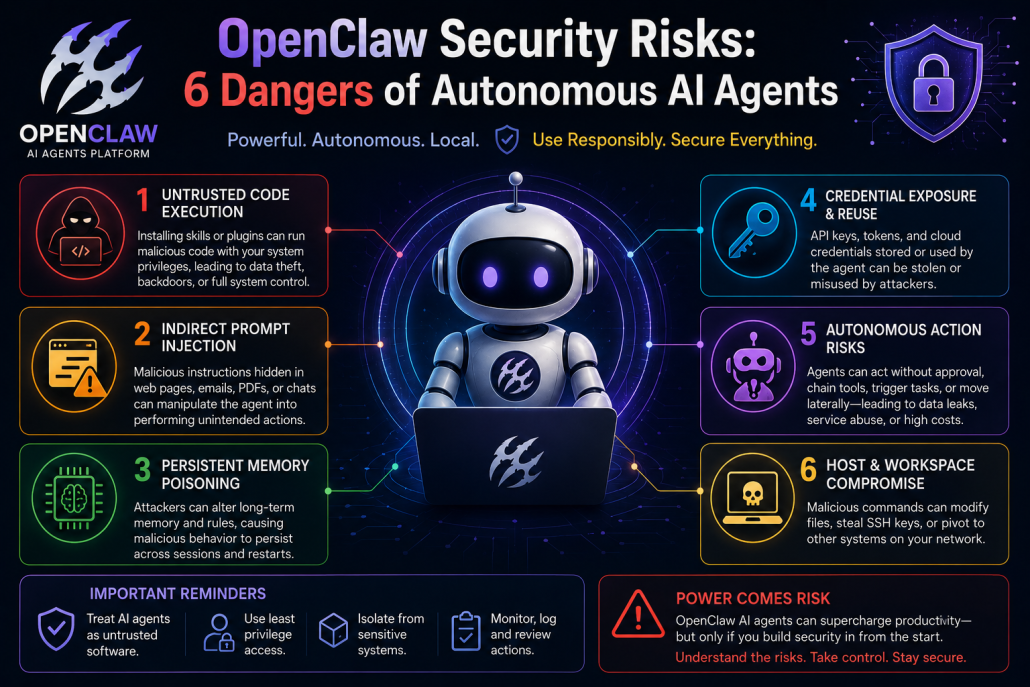
Several security risks deserve particular attention when using OpenClaw or similar AI agent platforms. Installing third-party skills or plugins is effectively the same as running external software on your computer, potentially allowing malware, credential theft, or unauthorized command execution. AI agents are also vulnerable to indirect prompt injection attacks, where hidden instructions inside web pages, emails, PDFs, or chat messages manipulate the agent into performing unintended actions. Persistent memory can be poisoned if attackers modify stored instructions that survive across multiple sessions. API keys, cloud credentials, OAuth tokens, and other sensitive secrets may also be exposed if the system is compromised. Autonomous agents can chain multiple actions together without approval, increasing the risk of unintended system changes, excessive API usage, or data leakage. Finally, because these agents often run directly on the host operating system, a successful attack could provide access to local files, SSH keys, connected servers, or other network resources.
Despite these concerns, AI agents remain one of the most promising directions in artificial intelligence. They have the potential to automate complex business processes, improve productivity, and eliminate countless repetitive tasks. The key is to deploy them responsibly. Treat AI agents as powerful but untrusted software, grant only the minimum permissions they require, isolate them from sensitive systems whenever possible, protect credentials carefully, and monitor their behavior continuously. Security should be designed into the system from the beginning rather than added after deployment. By following these principles, individuals and organizations can safely take advantage of AI agents while minimizing the risks that accompany this new generation of autonomous technology.
https://kiaapp.xyz/wp-content/uploads/2025/09/favicon2-4-300x200.png00Kiahttps://kiaapp.xyz/wp-content/uploads/2025/09/favicon2-4-300x200.pngKia2026-07-06 11:16:012026-09-17 21:45:16OpenClaw Security Risks: 6 Dangers of Autonomous AI Agents
Before comparing every AI model, one important point needs to be clear: ChatGPT is not the model. ChatGPT is the app. GPT is the model behind it. Think of ChatGPT as a door you walk through to access GPT. Copilot, Gemini, and Claude work in a similar way. Each has a different interface, logo, and product experience, but behind them sits a powerful AI model doing the real work.
Most AI models are trained on huge amounts of text, code, books, articles, and websites. They do not “memorize” information in the way humans do. Instead, they learn patterns. At the most basic level, many of these models predict the next word, or more accurately, the next token. That may sound simple, but when done extremely well, it can produce essays, explain science, write code, summarize documents, and answer complex questions. It is like autocomplete, but trained on a massive amount of information and improved to understand context far better.
Two important ideas help explain why some models feel smarter than others: parameters and context window. Parameters are like the internal settings the model uses to recognize patterns. More parameters usually mean the model can understand more complex relationships. The context window is how much information the model can keep in mind during a conversation. A larger context window means you can give it longer documents, bigger code files, or extended conversations without it losing track.
Some newer models also include stronger reasoning abilities. These models do not just answer immediately; they take more time to work through the problem. That makes them slower, but often much better for math, logic, coding, planning, and multi-step tasks.
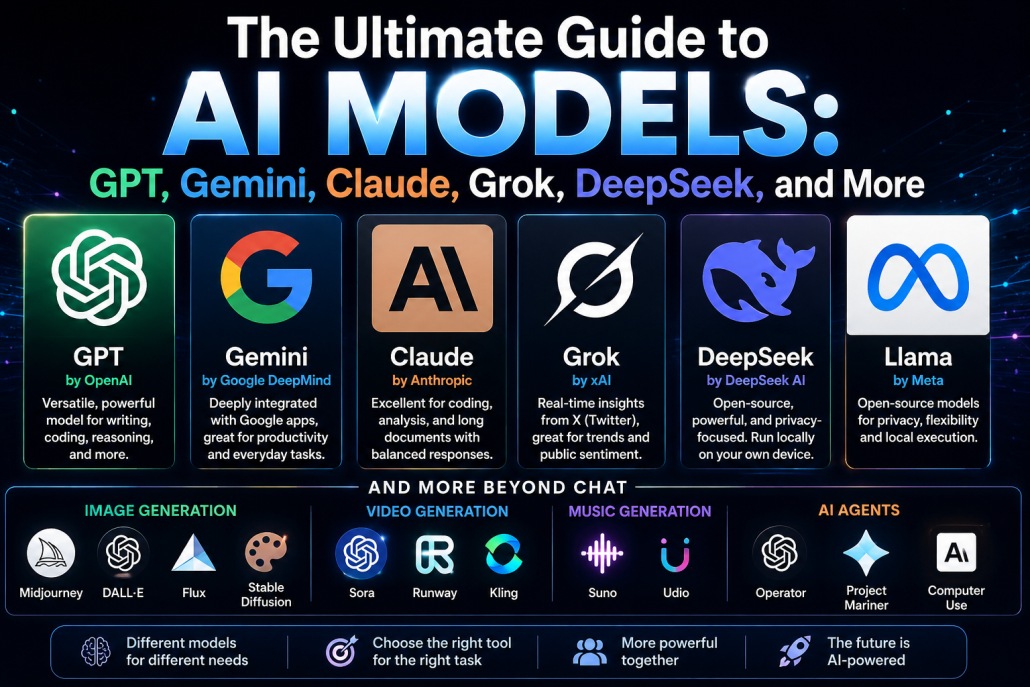
GPT, developed by OpenAI, is one of the most well-known model families because it is strong across many tasks. It can help with writing, analysis, coding, image-related work, voice interaction, and general problem solving. Its biggest advantage is not only the model itself, but the ecosystem around it. Many apps, plugins, businesses, and third-party tools are built around OpenAI’s GPT models, which makes them widely useful in everyday work.
Gemini, developed by Google DeepMind, is especially powerful because of its integration with Google’s ecosystem. If someone already uses Gmail, Google Docs, Sheets, Android, Search, or Maps, Gemini fits naturally into that workflow. Its strength is not only answering questions, but also helping inside the tools people already use every day.
Claude, developed by Anthropic, is often preferred for coding, long-document analysis, and deep reasoning. Many developers recommend Claude because it can review code, explain complex systems, and produce well-structured summaries. It is also known for providing more balanced and direct feedback rather than simply agreeing with every suggestion.
Grok, developed by xAI, is best known for its integration with X (formerly Twitter) and its ability to analyze real-time conversations and trending topics. This makes it particularly useful for following breaking news, monitoring public sentiment, and understanding online discussions as they happen.
DeepSeek, developed by DeepSeek AI, represents another important direction in AI development. As an open-source model, it allows users to download and run AI locally instead of relying on cloud services. Other open-source models such as Llama from Meta, Qwen from Alibaba, and Mistral from Mistral AI also give users greater control, improved privacy, and the ability to run powerful AI models on their own hardware.
Beyond conversational models, there are also specialized AI systems. Midjourney is widely regarded for producing highly artistic images. DALL·E, developed by OpenAI, is easy to use and performs particularly well when generating images containing readable text. Flux and Stable Diffusion offer greater customization and are popular among users who want to generate images locally.
For AI-generated video, Sora from OpenAI, Runway, and Kling are among the leading platforms, while Suno and Udio have become popular for creating complete songs with vocals and instruments from simple text prompts.
The next major evolution is AI agents. Instead of simply answering questions, AI agents can browse websites, execute code, manage files, fill out forms, and complete complex multi-step tasks with limited human supervision. Systems such as OpenAI Operator, Google Project Mariner, and Anthropic Computer Use demonstrate how AI is evolving from a conversational assistant into an autonomous digital worker.
The best strategy today is not to rely on a single AI model. Use GPT for general-purpose work, Gemini if you live inside Google’s ecosystem, Claude for programming and detailed analysis, Perplexity for research with source citations, and Llama or DeepSeek if privacy and local execution are priorities. AI is becoming less like one universal application and more like a complete toolbox, where choosing the right model for the right task produces the best results.
https://kiaapp.xyz/wp-content/uploads/2025/09/favicon2-4-300x200.png00Kiahttps://kiaapp.xyz/wp-content/uploads/2025/09/favicon2-4-300x200.pngKia2026-07-06 10:12:132026-09-17 22:40:41The Ultimate Guide to AI Models: GPT, Gemini, Claude, Grok, DeepSeek, and More
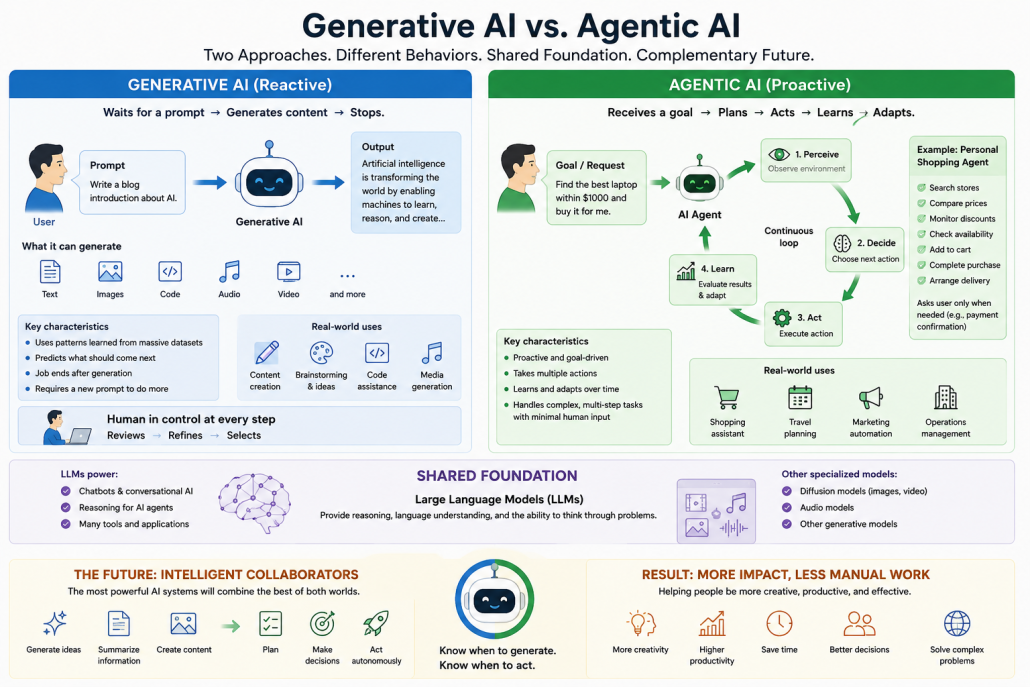
Generative AI and agentic AI represent two different approaches to artificial intelligence, even though they often rely on the same underlying technologies. Most people are already familiar with generative AI through tools like ChatGPT, image generators, code assistants, and music creation platforms. These systems are fundamentally reactive. They wait for a user to provide a prompt and then generate content based on patterns they learned during training. Depending on the task, that content might be text, images, computer code, audio, or other forms of digital media. In essence, generative AI predicts what should come next by recognizing statistical relationships learned from massive datasets. Once it produces the requested output, however, its job is complete. It does not continue working unless the user provides another instruction.
Agentic AI takes a very different approach. Instead of simply responding to prompts, it is designed to pursue goals by taking multiple actions with minimal human intervention. While an AI agent may also begin with a user request, it does not stop after generating an answer. Instead, it follows an ongoing cycle of observing its environment, deciding what action to take, executing that action, evaluating the results, and adjusting its behavior based on what it learns. This continuous perception–decision–action loop allows AI agents to handle complex tasks that require planning, coordination, and adaptation over time.
Although these two approaches behave differently, they often share the same foundation: large language models (LLMs). In conversational systems, LLMs provide the reasoning and language capabilities that power chatbots, while other specialized models, such as diffusion models, are commonly used for generating images, videos, and audio. In agentic AI, however, the language model serves a broader purpose. Rather than simply producing content, it becomes the reasoning engine that helps the agent analyze problems, make decisions, and determine the next steps toward achieving a goal.
The difference becomes clearer when looking at real-world applications. Generative AI is especially valuable for creative work. A writer might use it to draft articles, brainstorm ideas, improve a script, or generate illustrations. A YouTuber, for example, could ask an AI assistant to review a video script, suggest thumbnail concepts, generate background music, or rewrite an introduction. At every stage, however, the human remains in control, reviewing, refining, and selecting the best output. Generative AI creates possibilities, while the human decides which ones to use.
Agentic AI is better suited to tasks that involve multiple steps and ongoing decision-making. Imagine a personal shopping assistant. Instead of simply recommending a product, it could search multiple online stores, compare prices, monitor discounts over several days, check stock availability, complete the purchase when the desired price is reached, and arrange delivery. Throughout the process, it would only ask for human input when necessary, such as confirming a payment or approving a final decision.
A key capability that makes this possible is reasoning. Modern AI agents often rely on a technique known as chain-of-thought reasoning, where a complex problem is broken down into smaller logical steps. Rather than jumping directly to an answer, the AI effectively works through the problem one stage at a time, much like a person would. Consider an AI agent tasked with organizing a conference. It might first identify the event’s requirements, including budget, location, duration, and expected attendance. It would then search for suitable venues, compare their availability, evaluate pricing, coordinate speakers, and eventually produce a complete event plan. This internal reasoning process allows the agent to make informed decisions before taking action.
Looking ahead, the most powerful AI systems are unlikely to be purely generative or purely agentic. Instead, they will combine the strengths of both approaches. They will know when to generate ideas, summarize information, or create content, and when to move beyond generation by planning, making decisions, and carrying out tasks autonomously. These intelligent collaborators will not only help people think more creatively but will also help them accomplish increasingly complex goals with far less manual effort.
https://kiaapp.xyz/wp-content/uploads/2025/09/favicon2-4-300x200.png00Kiahttps://kiaapp.xyz/wp-content/uploads/2025/09/favicon2-4-300x200.pngKia2026-07-06 08:55:462026-09-17 19:33:43Generative AI vs. Agentic AI: Understanding the Key Differences and Real-World Applications
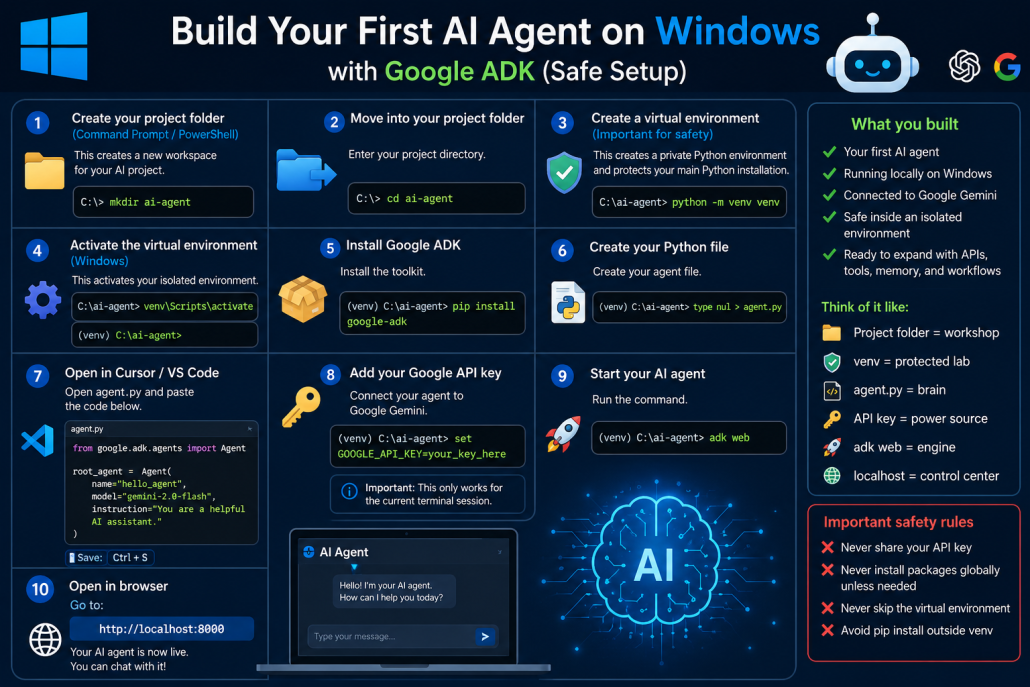
If you want to build your first AI agent on Windows safely without affecting your main Python installation, this is the cleanest way.
1. Create your project folder(Command Prompt / PowerShell)
This creates a new workspace for your AI project.
mkdir ai-agent
2. Move into your project folder
Enter your project directory.
cd ai-agent
Think of this as entering your AI workshop.
3. Create a virtual environment(Important for safety)
This creates a private Python environment for your project.
It protects your main Python installation from package conflicts.
python -m venv venv
This creates:
ai-agent\
└── venv\
Why this matters:
Without it, installing packages can break:
global Python packages
other projects
dependency versions
With it, your project stays isolated.
4. Activate the virtual environment
On Windows:
venv\Scripts\activate
After activation you should see:
(venv) C:\Users\YourName\ai-agent>
That means your isolated environment is active.
5. Install Google ADK
Install the toolkit:
pip install google-adk
This installs only inside your venv.
6. Create your Python file
Create your agent file:
type nul > agent.py
Or create it manually inside your editor.
7. Open your project in Cursor / VS Code
Open the whole:
ai-agent
folder.
Then open:
agent.py
Paste:
from google.adk.agents import Agent

root_agent = Agent(
    name="hello_agent",
    model="gemini-2.0-flash",
    instruction="You are a helpful AI assistant."
)
Save it.
8. Add your Google API key
Connect your agent to Google Gemini:
set GOOGLE_API_KEY=your_key_here
Replace with your real API key.
Important:
This only works for the current terminal session.
9. Start your AI agent
Run:
adk web
This launches the local web interface.
10. Open in browser
Go to:
http://localhost:8000
Your AI agent is now live.
You can chat with it directly.
What you built
You now have:
✅ Your first AI agent ✅ Running locally on Windows ✅ Connected to Google Gemini ✅ Protected inside an isolated Python environment ✅ Ready to expand with APIs, tools, memory, and workflows
Think of it like:
Project folder = workshop
venv = protected lab
agent.py = brain
API key = power source
adk web = engine
localhost = control center
Important safety rules
🚫 Never share your API key 🚫 Never install packages globally unless needed 🚫 Never skip the virtual environment 🚫 Avoid pip install outside venv
https://kiaapp.xyz/wp-content/uploads/2025/09/favicon2-4-300x200.png00Kiahttps://kiaapp.xyz/wp-content/uploads/2025/09/favicon2-4-300x200.pngKia2026-07-05 16:54:322026-09-17 10:32:53Build Your First AI Agent on Windows with Google ADK (Safe Setup)
1. Create your project folder(Do this in Terminal)
This creates a new folder where your AI project will live.
mkdir ai-agent
2. Move into your project folder(Terminal)
This enters your new project directory.
cd ai-agent
Think of this as entering your workshop.
3. Create a virtual environment(Terminal)
This creates an isolated Python environment for your project.
It keeps your Mac’s main Python safe.
python3 -m venv venv
It creates a folder called venv.
4. Activate the virtual environment(Terminal)
This tells your Mac:
Use this project’s Python, not the system Python.
source venv/bin/activate
After this you should see:
(venv) kiamalek@Kias-MacBook-Pro ai-agent %
That means you are safely inside your isolated environment.
5. Install Google ADK(Terminal)
This installs Google’s Agent Development Kit.
It is the toolkit used to build AI agents.
pip install google-adk
This installs everything only inside venv.
6. Create your Python file(Terminal)
This creates your agent file.
touch agent.py
This file will contain your agent’s brain.
7. Open the project in Cursor / VS Code
Open the whole ai-agent folder.
Inside it, open:
agent.py
Then paste:
from google.adk.agents import Agent

root_agent = Agent(
    name="hello_agent",
    model="gemini-2.0-flash",
    instruction="You are a helpful AI assistant."
)
What this means:
name = your agent’s identity
model = which Gemini model it uses
instruction = how it behaves
Save with:
Cmd + S
8. Add your Google API key(Back in Terminal)
This connects your agent to Google’s AI model.
Without this, it cannot generate responses.
export GOOGLE_API_KEY="your_key_here"
Replace:
your_key_here
with your real key.
Important: This only works for the current terminal session.
9. Start your AI agent(Terminal)
Run:
adk web
This launches your local AI web app.
It starts a local server on your Mac.
10. Open your agent in browser
Go to:
http://localhost:8000
Now your AI agent is live.
You can talk to it like a chatbot.
What you built
You now have:
✅ Your own AI agent ✅ Running locally on your Mac ✅ Using Google Gemini ✅ Safe inside an isolated environment ✅ Ready for expansion (tools, memory, APIs, workflows)
Think of it like:
Folder = workshop venv = protected lab agent.py = brain API key = power source adk web = engine start localhost = control panel
Important:
🚫 Never share your API key 🚫 Never use --break-system-packages 🚫 Never use sudo pip install
https://kiaapp.xyz/wp-content/uploads/2025/09/favicon2-4-300x200.png00Kiahttps://kiaapp.xyz/wp-content/uploads/2025/09/favicon2-4-300x200.pngKia2026-07-05 14:26:352026-09-17 20:15:03How to Build Your First AI Agent on Mac with Google ADK
Right now, somewhere in the world, an AI agent is booking flights, writing code, and answering customer questions—and it has absolutely no idea what it was doing five minutes ago. It’s like handing the keys to your company to a genius goldfish. Smart? Absolutely. Reliable? Not so much.
Today, we’re going to fix that.
We’re talking about something that sounds boring at first, but trust me, it’s one of the most important ideas in AI right now: operating systems. Not the kind on your laptop, but operating systems for AI agents. And by the end of this video, you’ll understand why this might be one of the most important pieces of AI infrastructure that almost nobody is talking about.
Let’s start simple.
Imagine you’re a kid in a kindergarten with no teacher. Nobody tells you where to sit, nobody organizes snack time, nobody makes sure nap time happens, and nobody stops the kids from turning finger paint into complete chaos. Sounds messy, right? Of course it does.
Now imagine the teacher walks in. Maybe she’s wearing a bright red jacket and carrying a whistle. Suddenly everything changes. There’s structure. Story time is at nine, snack time is at ten, nap time is after lunch, and if someone decides it’s a great idea to throw blocks across the room, there’s someone there to handle it.
That teacher? That’s an operating system.
On your computer, the operating system is the invisible manager making everything work together. When you open Spotify, it figures out how to send music to your speakers. When you open Google Chrome and Microsoft Word at the same time, it makes sure they share memory and processing power without fighting. Plug in a USB drive, and the OS recognizes it and makes it usable. You barely notice it, but without it, your computer is basically just an expensive paperweight.
Whether it’s Windows, macOS, or Linux, all operating systems do the same thing: they manage memory, schedule tasks, control access, and stop everything from crashing into everything else.
Now here’s where it gets interesting.
We’ve entered the age of AI agents. These aren’t just chatbots anymore. They don’t just answer questions—they do things. They can book flights, track expenses, write and run code, send emails, call APIs, and even talk to other agents. They’re basically digital employees.
But there’s a problem.
Right now, most AI agents are like toddlers running around unsupervised. They forget what they were doing, they don’t know what tools they’re allowed to use, they can’t explain why they made a decision, and they definitely don’t understand that deleting your production database is probably a terrible idea.
Every new conversation feels like a memory wipe.
“Hi, I’m your AI assistant. What’s your name?”
Buddy… we’ve talked fourteen times this week.
And when multiple agents try to work together, it’s like putting five toddlers in charge of a restaurant. Someone is ending up in the soup.
That’s why we need supervision.
What we really need is an operating system for AI agents.
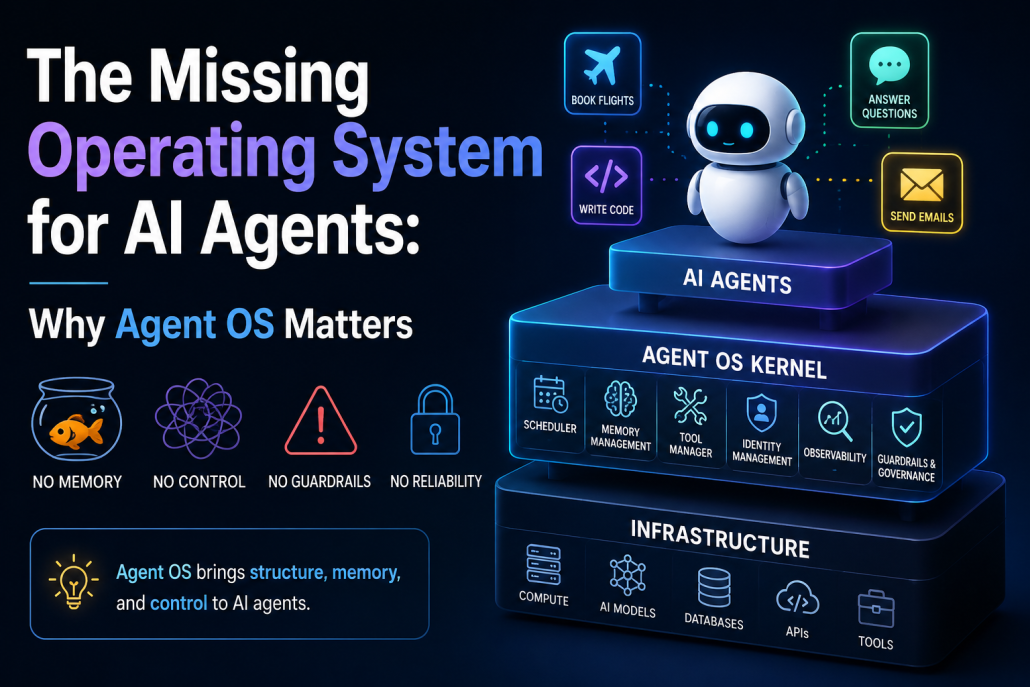
An Agent OS does for AI agents what an operating system does for apps. It manages resources, schedules work, stores memory, controls permissions, and keeps everything from going completely off the rails.
Think of it like a three-layer cake.
At the top, you have the AI agents themselves—the workers. Your travel agent, your coding agent, your customer support agent. Each one has a specific job. In the middle, you have the Agent OS kernel. This is the teacher’s desk, where all the coordination happens. And at the bottom, you have the infrastructure: the computers, the AI models, the databases, the APIs, and the tools that make everything possible.
Now the middle layer is where the magic happens.
First, there’s the scheduler. Think of it as the teacher’s daily plan. If ten agents all want to use the AI model at once, someone has to decide who goes first. Should the live customer support chat get priority over a background report? The scheduler makes that call.
Then there’s memory management, which solves the goldfish problem. It gives agents short-term memory for the task they’re working on, long-term memory for past work, and even experience-based memory—like remembering that the last time they tried something, it failed. So if your HR agent helped you with parental leave last month, it won’t start from zero when you come back.
Next is the tool manager. Agents need tools—email, databases, APIs, code execution. The tool manager organizes all of that. It knows what tools exist, who can use them, and runs them inside a sandbox. Why? Because if an agent writes code, you don’t want it accidentally wiping your live database. The sandbox is like a safe playroom where the agent can experiment without breaking the house.
Then comes identity management. This answers a simple question: who are you, and what are you allowed to do? Just like employees have ID badges, agents need credentials too. Temporary tokens, limited permissions, and clear ownership. If your travel agent books a flight using your card, there should be a clear record showing it acted on your behalf.
After that comes observability—basically the security camera system. Every action, every tool call, every decision gets logged. If something goes wrong, you can rewind the tape and see exactly why. If an agent approves a refund it shouldn’t have, observability helps you trace the mistake.
And finally, there are guardrails and governance. These are the rules. The boundaries. The “maybe don’t do that” system. Input guardrails check what comes in. Is someone trying to trick the agent? Output guardrails check what goes out. Is the agent about to say something harmful or incorrect? And governance decides when humans need to step in—the human-in-the-loop system. For example, refunds under fifty dollars might be automatic. Over fifty? That needs human approval.
So why does any of this matter?
Because AI agents aren’t some future concept anymore. They’re here now. Companies are already using them for customer service, coding, operations, and financial decisions. And many are doing it without the infrastructure to manage them properly.
That’s like running a busy city without traffic lights.
It works… until it doesn’t.
The teams building Agent OS today will scale faster, safer, and more reliably. Everyone else will be stuck managing expensive, fragile experiments with goldfish memories.
So here’s the big takeaway: a traditional operating system keeps apps organized and working together. An Agent OS does the same for AI agents. It manages scheduling, memory, tools, identity, observability, and guardrails.
Without it, agents are smart—but chaotic.
With it, they become infrastructure you can actually trust.
The age of AI agents is already here.
The real question is: who’s going to be the teacher?
https://kiaapp.xyz/wp-content/uploads/2025/09/favicon2-4-300x200.png00Kiahttps://kiaapp.xyz/wp-content/uploads/2025/09/favicon2-4-300x200.pngKia2026-07-05 08:43:202026-10-08 19:47:54The Missing Operating System for AI Agents: Why Agent OS Matters