Build Your First AI Agent on Windows with Google ADK (Safe Setup)
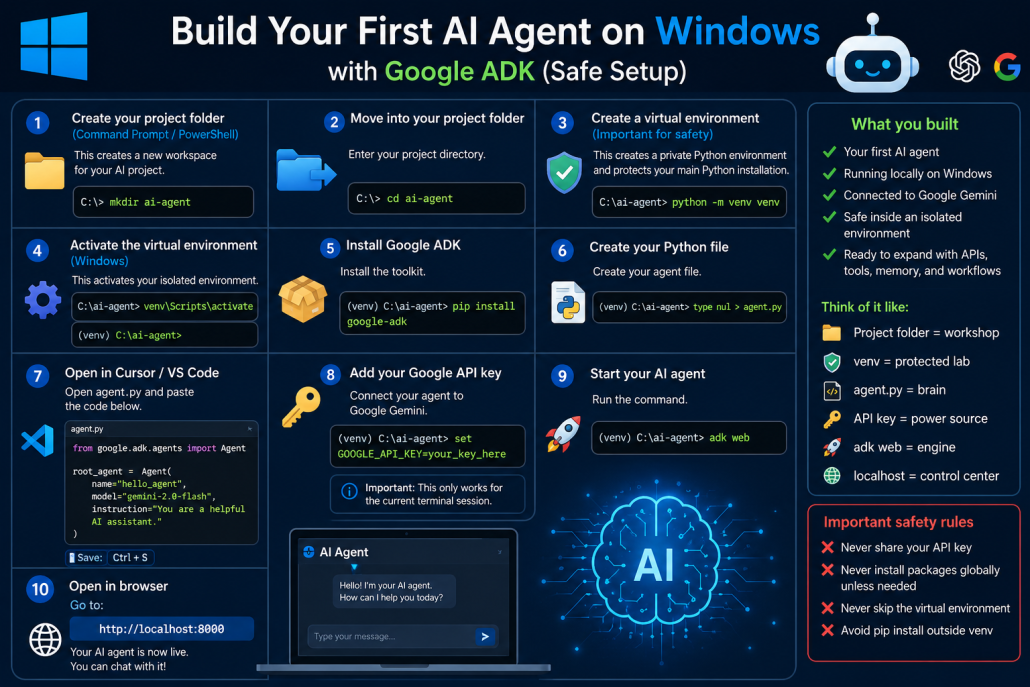
If you want to build your first AI agent on Windows safely without affecting your main Python installation, this is the cleanest way.
1. Create your project folder(Command Prompt / PowerShell)
This creates a new workspace for your AI project.
mkdir ai-agent2. Move into your project folder
Enter your project directory.
cd ai-agentThink of this as entering your AI workshop.
3. Create a virtual environment(Important for safety)
This creates a private Python environment for your project.
It protects your main Python installation from package conflicts.
python -m venv venvThis creates:
ai-agent\
└── venv\
Why this matters:
Without it, installing packages can break:
- global Python packages
- other projects
- dependency versions
With it, your project stays isolated.
4. Activate the virtual environment
On Windows:
venv\Scripts\activateAfter activation you should see:
(venv) C:\Users\YourName\ai-agent>That means your isolated environment is active.
5. Install Google ADK
Install the toolkit:
pip install google-adkThis installs only inside your venv.
6. Create your Python file
Create your agent file:
type nul > agent.pyOr create it manually inside your editor.
7. Open your project in Cursor / VS Code
Open the whole:
ai-agentfolder.
Then open:
agent.pyPaste:
from google.adk.agents import Agent

root_agent = Agent(
    name="hello_agent",
    model="gemini-2.0-flash",
    instruction="You are a helpful AI assistant."
)
Save it.
8. Add your Google API key
Connect your agent to Google Gemini:
set GOOGLE_API_KEY=your_key_hereReplace with your real API key.
Important:
This only works for the current terminal session.
9. Start your AI agent
Run:
adk webThis launches the local web interface.
10. Open in browser
Go to:
http://localhost:8000Your AI agent is now live.
You can chat with it directly.
What you built
You now have:
✅ Your first AI agent
✅ Running locally on Windows
✅ Connected to Google Gemini
✅ Protected inside an isolated Python environment
✅ Ready to expand with APIs, tools, memory, and workflows
Think of it like:
- Project folder = workshop
- venv = protected lab
- agent.py = brain
- API key = power source
- adk web = engine
- localhost = control center
Important safety rules
🚫 Never share your API key
🚫 Never install packages globally unless needed
🚫 Never skip the virtual environment
🚫 Avoid pip install outside venv