
Complete Command Guide for ADK Web Development and Google Cloud Deployment
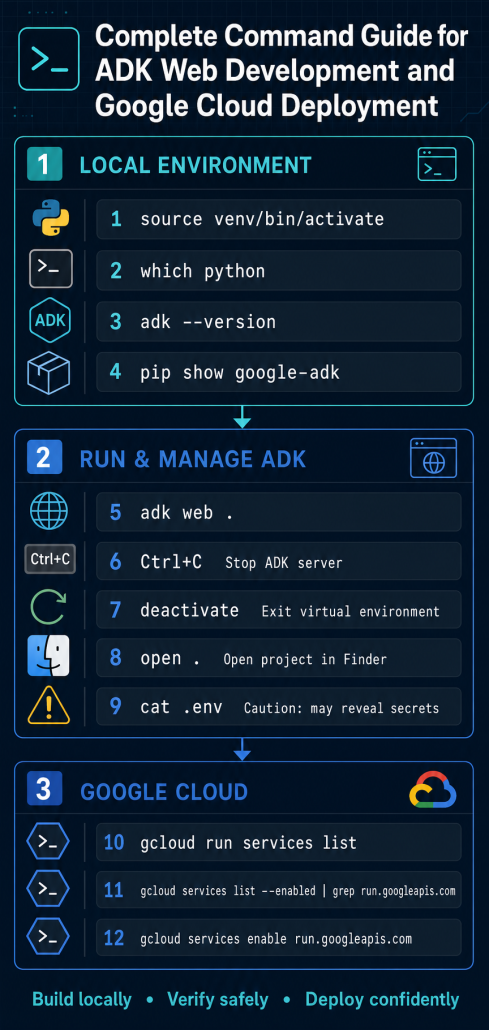
Complete Google ADK CLI Command List
The current Google ADK Python CLI command tree includes api_server, conformance, create, deploy, eval, eval_set, migrate, optimize, run, test, and web. Your installed version may differ, so verify it locally with adk --help. Official ADK CLI reference
1. Display ADK help
adk --helpShows every top-level command available in your installed ADK version.
For help with a specific command:
adk COMMAND --helpExample:
adk web --help2. Display the installed ADK version
adk --versionConfirms which ADK CLI version is active.
3. Create a new agent project
adk create APP_NAMEExample:
adk create my_agentCreates a new directory containing a prepopulated agent template.
Useful options:
adk create my_agent --model=MODEL_NAMEadk create my_agent --api_key=API_KEYadk create my_agent \
--project=PROJECT_ID \
--region=REGIONAvailable options:
--model: Model for the root agent--api_key: Google AI API key--project: Google Cloud project for Vertex AI--region: Google Cloud region for Vertex AI
Avoid placing API keys directly in shell history; environment variables or secret management are safer.
4. Run an agent in the terminal
Interactive mode:
adk run path/to/my_agentSingle-query mode:
adk run path/to/my_agent "Hello"This runs the agent directly in the terminal without starting a browser.
Useful options:
adk run path/to/my_agent --save_sessionadk run path/to/my_agent --resume=SESSION_FILE.jsonadk run path/to/my_agent --replay=REPLAY_FILE.jsonadk run path/to/my_agent --state='{"language":"English"}'adk run path/to/my_agent --timeout=30sadk run path/to/my_agent --in_memoryadk run path/to/my_agent --jsonlImportant options:
--save_session: Save the session when exiting--session_id: Set the saved session ID--resume: Continue a saved session--replay: Replay queries from a JSON file--state: Provide initial state as JSON--timeout: Limit the duration of a turn--in_memory: Avoid persistent session storage--jsonl: Produce machine-readable JSONL output--default_llm_model: Set the default model--session_service_uri: Select session storage--artifact_service_uri: Select artifact storage--memory_service_uri: Select memory storage
5. Start the ADK development web interface
adk webFrom the parent directory containing your agents:
adk web .Specify the agents directory:
adk web path/to/agentsSpecify a port:
adk web --port=8080 path/to/agentsAllow a frontend origin:
adk web \
  --allow_origins=https://example.com \
  path/to/agents
Enable debugging and automatic reload:
adk web \
  --log_level=DEBUG \
  --reload \
  --reload_agents \
  path/to/agents
Important options:
--host: Binding address; default is127.0.0.1--port: Server port--allow_origins: Allowed CORS origins-vor--verbose: Debug logging--log_level: Logging level--reload: Restart the server after code changes--reload_agents: Reload changed agents--url_prefix: Serve behind a path such as/adk--logo-text: Customize the UI logo text--logo-image-url: Customize the UI logo image--a2a: Enable the Agent-to-Agent endpoint--trace_to_cloud: Export Cloud Trace data--otel_to_cloud: Export OpenTelemetry data--default_llm_model: Supply a default model--extra_plugins: Enable additional plugins--trigger_sources: Enable sources such as Pub/Sub or Eventarc--session_service_uri: Configure session storage--artifact_service_uri: Configure artifact storage--memory_service_uri: Configure memory storage--use_local_storage: Store local ADK data under.adk
adk web is intended for development and testing—not as a production web interface.
6. Start the ADK API server
adk api_serverSpecify the agents directory:
adk api_server path/to/agentsSpecify the host and port:
adk api_server \
  --host=127.0.0.1 \
  --port=8000 \
  path/to/agents
Allow requests from a frontend:
adk api_server \
  --allow_origins=https://example.com \
  path/to/agents
Automatically create missing sessions:
adk api_server \
  --auto_create_session \
  path/to/agents
Include the web interface:
adk api_server \
  --with_ui \
  path/to/agents
This exposes agents through REST endpoints for connection to a website, mobile application, backend, or test client. By default, it runs at http://localhost:8000. ADK API Server documentation
It supports most of the server options available to adk web, including:
--host--port--allow_origins--log_level--reload--reload_agents--a2a--url_prefix--trigger_sources--session_service_uri--artifact_service_uri--memory_service_uri--trace_to_cloud--otel_to_cloud
Deployment commands
7. Display deployment options
adk deploy --helpADK currently provides deployment subcommands for:
- Cloud Run
- Agent Engine
- Google Kubernetes Engine
8. Deploy to Cloud Run
adk deploy cloud_run \
  --project=PROJECT_ID \
  --region=REGION \
  path/to/my_agent
With an explicit service name:
adk deploy cloud_run \
  --project=PROJECT_ID \
  --region=REGION \
  --service_name=my-agent-service \
  --app_name=my_agent \
  path/to/my_agent
Development deployment with the ADK UI:
adk deploy cloud_run \
  --project=PROJECT_ID \
  --region=REGION \
  --service_name=my-agent-service \
  --with_ui \
  path/to/my_agent
The UI is intended only for development and testing. Production deployments should normally expose the API server without --with_ui.
Important options:
--project: Google Cloud project--region: Cloud Run region--service_name: Cloud Run service name--app_name: ADK API application name--port: Server port--with_ui: Include the development UI--trace_to_cloud: Enable Cloud Trace--otel_to_cloud: Enable Google Cloud observability--log_level: Logging level--adk_version: ADK version deployed--a2a: Enable the A2A endpoint--allow_origins: Configure CORS--trigger_sources: Enable Pub/Sub or Eventarc triggers--session_service_uri: Configure session storage--artifact_service_uri: Configure artifact storage--memory_service_uri: Configure memory storage
Pass additional gcloud flags after --:
adk deploy cloud_run \
  --project=PROJECT_ID \
  --region=REGION \
  path/to/my_agent \
  -- \
  --no-allow-unauthenticated \
  --min-instances=2
Official Cloud Run deployment reference
9. Deploy to Vertex AI Agent Engine
Using a Google Cloud project:
adk deploy agent_engine \
  --project=PROJECT_ID \
  --region=REGION \
  --display_name="My Agent" \
  path/to/my_agent
Using Express Mode:
adk deploy agent_engine \
  --api_key=API_KEY \
  path/to/my_agent
Update an existing Agent Engine resource:
adk deploy agent_engine \
  --project=PROJECT_ID \
  --region=REGION \
  --agent_engine_id=AGENT_ENGINE_ID \
  path/to/my_agent
Important options:
--api_key: Express Mode API key--project: Google Cloud project--region: Google Cloud region--agent_engine_id: Update an existing deployment--display_name: Agent display name--description: Agent description--adk_app: Python file defining the ADK application--adk_app_object: Eitherroot_agentorapp--env_file: Environment-variable file--requirements_file: Python requirements file--agent_engine_config_file: Agent Engine configuration file--validate-agent-import: Validate imports before deployment--trace_to_cloud: Enable Cloud Trace--otel_to_cloud: Enable OpenTelemetry
10. Deploy to Google Kubernetes Engine
adk deploy gke \
  --project=PROJECT_ID \
  --region=REGION \
  --cluster_name=CLUSTER_NAME \
  path/to/my_agent
Expose it through a load balancer:
adk deploy gke \
  --project=PROJECT_ID \
  --region=REGION \
  --cluster_name=CLUSTER_NAME \
  --service_type=LoadBalancer \
  path/to/my_agent
Important options:
--project--region--cluster_name--service_name--app_name--port--service_type=ClusterIP--service_type=LoadBalancer--with_ui--trace_to_cloud--otel_to_cloud--log_level--adk_version--trigger_sources- Storage and memory service URI options
Evaluation and testing
11. Evaluate an agent
adk eval \
  path/to/my_agent/__init__.py \
  path/to/eval_set.json
Evaluate multiple sets:
adk eval \
  path/to/my_agent/__init__.py \
  eval_set_1.json \
  eval_set_2.json
Run selected cases:
adk eval \
  path/to/my_agent/__init__.py \
  eval_set.json:eval_1,eval_2
Print detailed results:
adk eval \
  --print_detailed_results \
  path/to/my_agent/__init__.py \
  eval_set.json
Important options:
--config_file_path--print_detailed_results--eval_storage_uri--log_level--enable_features--disable_features
12. Display evaluation-set commands
adk eval_set --helpThe eval_set group manages collections of evaluation cases.
13. Create an empty evaluation set
adk eval_set create \
  path/to/my_agent/__init__.py \
  EVAL_SET_ID
With Cloud Storage:
adk eval_set create \
  --eval_storage_uri=gs://BUCKET_NAME \
  path/to/my_agent/__init__.py \
  EVAL_SET_ID
14. Add an evaluation case
Using a scenarios file:
adk eval_set add_eval_case \
  --scenarios_file=scenarios.json \
  path/to/my_agent/__init__.py \
  EVAL_SET_ID
Using a session input file:
adk eval_set add_eval_case \
  --session_input_file=session.json \
  path/to/my_agent/__init__.py \
  EVAL_SET_ID
15. Generate evaluation cases
adk eval_set generate_eval_cases \
  --user_simulation_config_file=user-simulation.json \
  path/to/my_agent/__init__.py \
  EVAL_SET_ID
This uses the Vertex AI evaluation tooling to generate conversation scenarios dynamically.
16. Run ADK JSON tests
adk testSpecify a folder:
adk test path/to/agentsRebuild test files by running the real agent:
adk test --rebuild path/to/agentsConformance testing
17. Display conformance commands
adk conformance --helpConformance tests check whether agent behavior remains consistent.
18. Record conformance tests
Non-streaming:
adk conformance record tests noneSSE streaming:
adk conformance record tests sseBidirectional streaming:
adk conformance record tests bidiThis feature is marked as work in progress in the current reference.
19. Run conformance tests
adk conformance testSpecify test folders:
adk conformance test tests/core tests/toolsGenerate a Markdown report:
adk conformance test \
  --generate_report \
  --report_dir=reports
Choose replay mode:
adk conformance test \
  --mode=replay \
  tests
The documented live mode is not yet implemented in the current reference.
Optimization and migration
20. Optimize the root-agent instructions
adk optimize \
  --sampler_config_file_path=sampler-config.json \
  path/to/my_agent/__init__.py
With a custom optimizer configuration:
adk optimize \
  --sampler_config_file_path=sampler-config.json \
  --optimizer_config_file_path=optimizer-config.json \
  --print_detailed_results \
  path/to/my_agent/__init__.py
This uses the GEPA optimizer to improve the root agent’s instructions based on evaluation data.
21. Display migration commands
adk migrate --helpThe migration group currently provides session-database migration.
22. Migrate a session database
adk migrate session \
  --source_db_url=sqlite:///old-sessions.db \
  --dest_db_url=sqlite:///new-sessions.db
Migrates session data into the latest database schema.
Setup commands related to ADK
These are package-management commands, not ADK subcommands.
Install Google ADK
pip install google-adkUpgrade Google ADK
pip install --upgrade google-adkInspect the installed package
pip show google-adkConfirm the executable location
which adkStop any running ADK server
Ctrl+CComplete command tree
adk
├── api_server
├── conformance
│   ├── record
│   └── test
├── create
├── deploy
│   ├── agent_engine
│   ├── cloud_run
│   └── gke
├── eval
├── eval_set
│   ├── add_eval_case
│   ├── create
│   └── generate_eval_cases
├── migrate
│   └── session
├── optimize
├── run
├── test
└── web
For everyday development, the five most important commands are:
adk create my_agent
adk run my_agent
adk web .
adk api_server .
adk deploy cloud_run --project=PROJECT_ID --region=REGION my_agent