Blog Post

MongoDB Schema Design Best Practices

MongoDB’s aggregation framework provides many stages to query, process, and transform data. While you can use and combine stages as you like, there are several common pipelines you can use as blueprints to accomplish common tasks.

In this guide, we’ll walk you through one common aggregation pipeline sequence using the match, group, and project stages.

Match is used to filter for specific documents. The group stage groups documents by a specified value. Finally, the project stage is used so the pipeline returns only the fields we need.

Before we get into the pipeline, let’s briefly introduce you to the dataset.

We’ll be working with data from an online bookstore app in a sales collection. We want to generate a report showing the total revenue generated from book sales for each genre of book during twenty twenty-five.

We can use this information to make informed decisions about inventory and marketing. We’ll use MongoDB’s aggregation framework to accomplish this task.

Let’s get started.

First, let’s look at an example document from the sales collection. As you can see, it contains documents that record all of the books sold to a specific customer on a particular date.

The customer is recorded as an object ID, which references our customer collection.

Note that the books field is an array where each book in the array contains the genre and price.

We need to group all books sold by genre. To do this, we’ll use the match and group stages.

Since the genres are stored in an array, we also need an unwind stage after the match stage in our pipeline.

The unwind stage deconstructs an array field from the input documents. It outputs a document for each element of the array, effectively flattening the array.

By unwinding the books array, each book sold in every sales document will be represented by its own document in the output of this stage. This is crucial for setting up the next stage where we group them by genre.

Since we want our report to aggregate data from the year twenty twenty-five, the first thing we’ll do is ensure that we’re only working with sales documents from that year.

To accomplish this, we’ll write a match stage using the greater than or equal to and less than operators to specify that the date should be on or after January first twenty twenty-five and before January first twenty twenty-six.

As discussed earlier, it’s usually best to place a match stage at the beginning of a pipeline. Not only does this reduce the size of the dataset being passed to the next stage, but it also allows us to use existing indexes to improve performance.

If we only ran the match stage, the pipeline would return all documents with a date field in the year twenty twenty-five.

If that was our only goal, a simple find operation would be enough. But since we want to calculate and transform data, we need additional stages.

Now we have sales by year.

Next, to track each book sold, we’ll unwind the books array so we can group them by genre.

After using unwind, we now have one document for each book sold in twenty twenty-five.

The next step is grouping these documents by genre and calculating how much revenue they generated.

We do this by adding a group stage and specifying the group key as the genre of each book.

Because the genre field is inside the embedded books document, we use dot notation:

books.genre

We also use the sum operator to add up all sales and create a field named total revenue.

This field shows how much revenue each genre generated.

Now we’ve transformed our data from sales by customer into revenue by genre.

We now have one document for each genre showing the total revenue.

To make the output cleaner, we use the project stage.

Project allows us to exclude, include, rename, or create new fields.

Here, we rename the group ID field to genre so it is easier for stakeholders to understand.

To do this, we remove the group ID field by setting it to zero, create a new field called genre, and assign it the value of the old group ID.

We also keep the total revenue field by setting it to one.

After running the aggregation pipeline, we can clearly see the total revenue generated by each book genre.

To recap, this example used the pipeline sequence:

Match → Unwind → Group → Project

This pattern is one of the most common and powerful ways to filter, transform, and analyze data in MongoDB.

The unwind stage was essential here because the field we grouped by was stored inside an array.

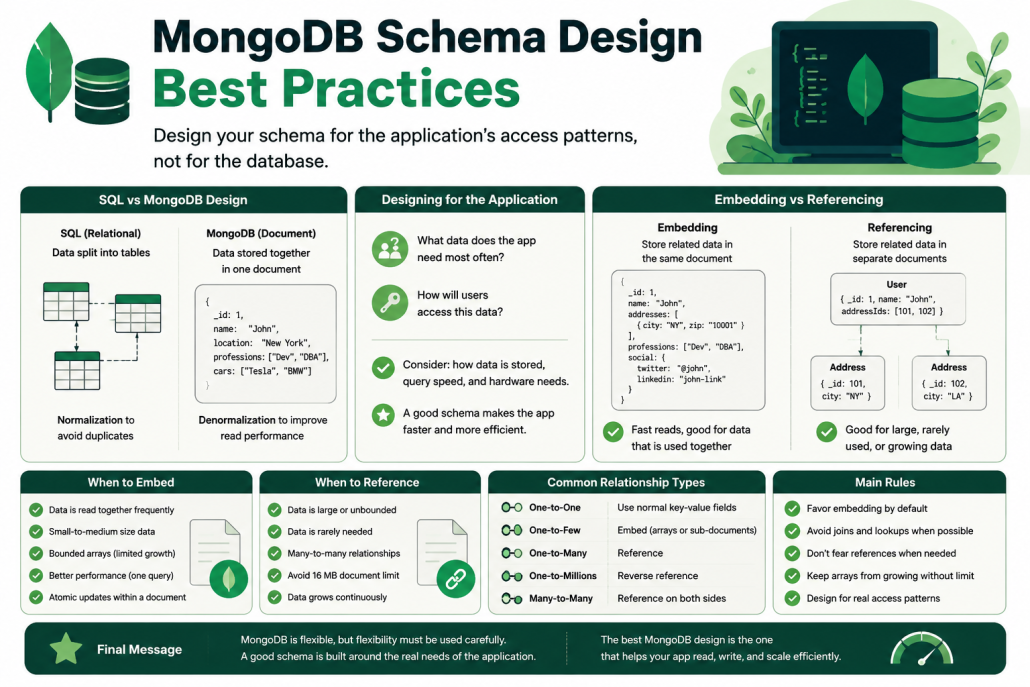
MongoDB Schema Design Best Practices

Visual guide explaining MongoDB schema design best practices, including SQL vs MongoDB structure, embedding vs referencing, and common data modeling patterns.

MongoDB Schema Design Explained: Embedding vs Referencing

This presentation explains why MongoDB schema design is one of the most important parts of building a fast and scalable application. The speaker explains that many developers focus first on indexing, caching, or hardware, but the real foundation is how the data is structured. If the schema is poorly designed, the application may become slow even before it grows.

The researcher introduces the topic from a developer’s point of view. He explains that many developers come to MongoDB with a traditional SQL mindset. They often design MongoDB collections the same way they design relational database tables. This can work in some cases, but it often causes performance problems because MongoDB is designed differently.

SQL vs MongoDB Design

In a traditional SQL database, developers usually design data by separating it into tables. For example, a user table may be separate from a professions table and a cars table. These tables are connected through foreign keys. This process is called normalization, and its main goal is to avoid duplicate data.

MongoDB works differently. Instead of splitting everything into separate tables, MongoDB allows related data to be stored together in one document. For example, a user document can include the user’s name, location, professions, and cars all in one place. This makes it easier and faster to read the data when the application needs everything at once.

Designing for the Application

The key message is that MongoDB schema design should be based on how the application uses the data. The developer should ask: “What data does the app need most often?” and “How will users access this data?”

There are three important things to consider: how the data is stored, how fast queries need to be, and how much hardware is needed. A good schema should help the app run faster without requiring unnecessary server power.

Embedding vs Referencing

The researcher explains that MongoDB schema design mainly depends on two choices: embedding and referencing.

Embedding means placing related data inside the same document. For example, a user profile can include addresses, professions, or social links directly inside the user document. This is useful when the app usually needs all that data together. It allows the app to get everything with one query.

Referencing means storing related data in separate documents and connecting them with IDs. This is useful when the related data is large, rarely needed, or may grow too much. For example, an e-commerce product may reference thousands of parts instead of storing all parts inside one product document.

When to Embed

Embedding is usually the better default choice in MongoDB. It is fast because the app can retrieve all needed data in one query. It also allows updates inside one document to be handled safely and efficiently.

For example, if a profile page always needs the user’s name, city, and social links, those fields should probably be embedded in the same document.

When to Reference

Referencing is better when documents become too large or when some data is not always needed. MongoDB documents have a 16 MB size limit, so very large arrays or unlimited growing data should not be embedded.

For example, server logs should not be stored inside one server document forever. Logs can grow endlessly. In that case, each log message should be stored separately and reference the server it belongs to.

Common Relationship Types

For one-to-one relationships, MongoDB can simply use normal key-value fields.

For one-to-few relationships, such as a user with a few addresses, embedding works well.

For one-to-many relationships, such as a product with many parts, referencing may be better.

For one-to-millions relationships, such as servers with endless logs, reverse referencing is usually the right choice.

For many-to-many relationships, such as users and tasks, both documents may reference each other.

Main Rules

The researcher gives several practical rules. Developers should favor embedding unless there is a strong reason not to. They should avoid joins and lookups when possible, but they should not fear references when they make the design better.

Arrays should not grow without limit. Most importantly, the schema must match the application’s real access patterns.

Final Message

The main lesson is simple: MongoDB is flexible, but that flexibility must be used carefully. A good schema is not copied from SQL design. It is built around the real needs of the application.

In the end, the best MongoDB design is the one that helps the app read, write, and scale efficiently.

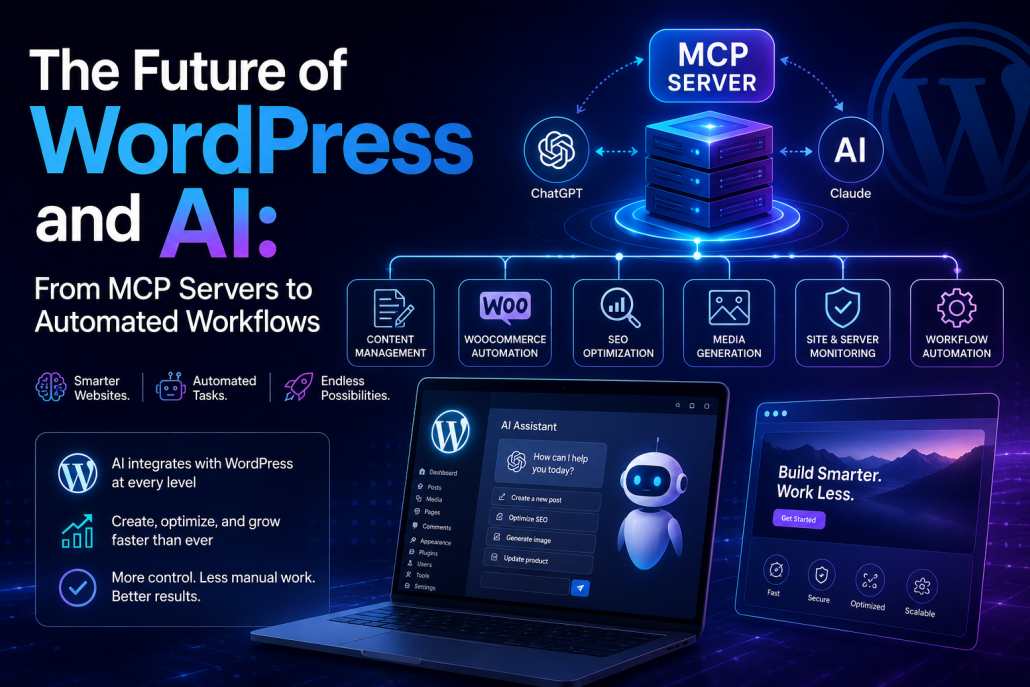
The Future of WordPress and AI: From MCP Servers to Automated Workflows

    AI in WordPress

It feels like every month artificial intelligence is becoming more deeply integrated into the tools we use every day. Recently, we’ve seen major AI developments in browsers with tools like Perplexity AI Comet and new features from OpenAI ChatGPT. But this shift is not limited to browsers. It is happening just as fast inside WordPress and throughout the web design process. AI is no longer a simple gimmick or a fun experiment. It is becoming a real part of how websites are built, managed, and optimized. That is why understanding these changes matters now more than ever.

One of the biggest developments inside WordPress is the rise of MCPs (Model Context Protocols). Think of MCP as a bridge between your website and large language models like OpenAI ChatGPT or Anthropic Claude. In simple terms, it works like an API designed specifically for AI. This connection allows your AI assistant to interact directly with your website and perform tasks. Instead of logging into WordPress and manually updating content, you could ask ChatGPT to publish a post, edit a page, generate images, or optimize SEO—all directly from the AI interface itself.

This becomes even more powerful when combined with WooCommerce. Imagine asking AI to add products, update descriptions, optimize product titles, or adjust pricing details. These are repetitive tasks that usually take time, but with MCPs they can become almost instant. Plugins like MCP Adapter are making this possible by turning a WordPress site into an MCP server, opening up a new level of automation.

The next major shift is happening in page builders. Elementor is now moving beyond its old AI content tools with new systems like Angie. This is much more than generating text. It can change visuals, edit graphics, update images, and even create promotions or sitewide sales. Tasks like setting up discounts, launching campaigns, or creating coupons can be handled with simple AI instructions. Think of it like giving tasks to a virtual assistant: “Update the homepage,” “launch a sale,” or “create a coupon.” These are exactly the kinds of tasks AI is beginning to handle.

AI agents are another huge step forward. Tools like AutoKit are bringing AI agents directly into WordPress itself. Before, creating AI agents often required external automation platforms like Make or N8N. Now, these workflows can live inside your website. That means more control, faster automation, and deeper integration. Instead of relying on separate services, WordPress itself can become the center of your AI-powered workflow.

Plugins are evolving quickly too. Tools like AI Engine are already showing what’s possible. From chatbots to content generation and image management, these plugins are expanding what WordPress can do. Even SEO tools are changing. For example, SEOPress has useful AI integrations like automatic alt-text generation for uploaded images. What once felt advanced now seems basic compared to what direct AI-to-WordPress connections can do.

Hosting is also becoming smarter. Companies like Cloudways are integrating AI tools such as Co-Pilot for server monitoring. This is a big deal because hosting issues can be hard to diagnose. AI can monitor uptime, detect attacks like DDoS, identify bot overload, and suggest configuration fixes. Instead of just telling you something is wrong, it can offer solutions and even help apply them. It’s like having an extra technical assistant watching your server 24/7.

Finally, AI is transforming the design side too. Figma has been adding AI tools that make design tasks much faster. Something simple like removing a background from an image, which used to take several minutes in software like Affinity Photo, can now be done almost instantly. These small improvements save time and make workflows smoother. And this is likely just the beginning.

Looking ahead, AI is spreading into five key layers of the WordPress ecosystem: the core platform, page builders, plugins, hosting, and design tools. That means the entire website-building process is changing from top to bottom. A year from now, WordPress could look very different, with AI playing a central role in almost every task. Right now, we are only at the start of that transformation, and the possibilities ahead are far bigger than most people realize.

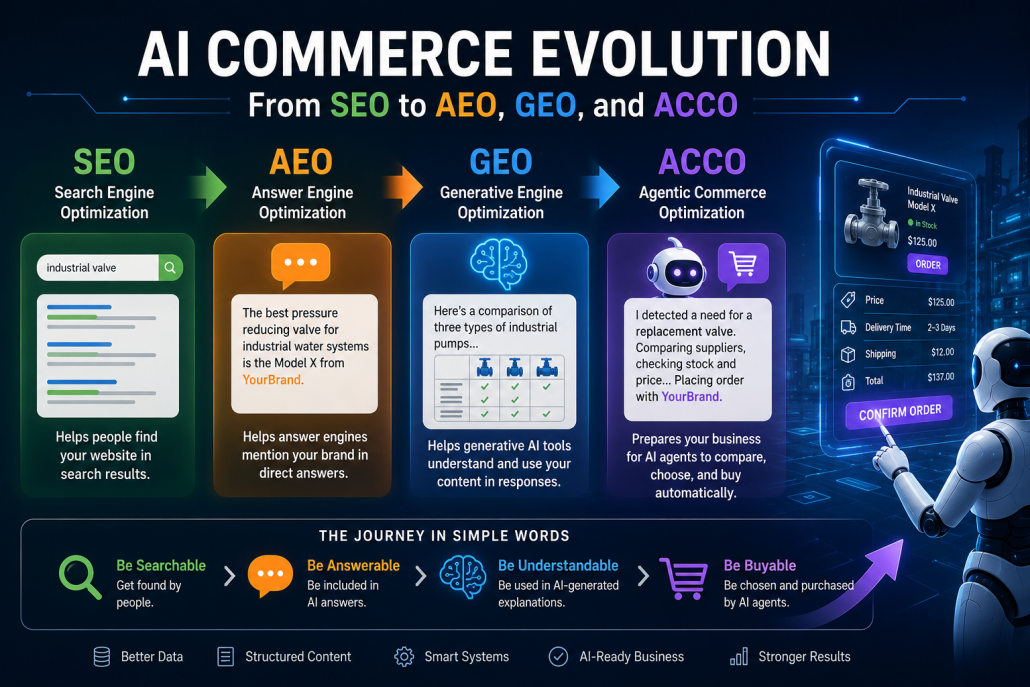
AI Commerce Evolution: From SEO to AEO, GEO, and ACCO

Infographic showing the evolution of AI commerce from SEO to AEO, GEO, and ACCO, illustrating how businesses move from search visibility to AI-driven answers, generative recommendations, and automated agent-based purchasing.

Artificial intelligence is changing digital commerce in a very practical way. In the past, businesses focused mainly on SEO so people could find their websites on Google. That still matters, but it is no longer enough. Buyers are changing how they search, compare, and purchase products. They now ask AI tools questions, use chatbots to compare options, receive direct answers from search engines, and may soon rely on AI agents to make buying decisions for them.

This shift can be understood as a journey from SEO to AEO, GEO, and ACCO. SEO helps people find your website. AEO helps answer engines mention your brand in direct answers. GEO helps generative AI tools understand and use your content when creating responses. ACCO prepares your business for a future where AI agents can compare, choose, and even buy your products automatically.

AEO, or Answer Engine Optimization, is about preparing your content so AI-powered answer engines can use it directly. In traditional SEO, the goal was to appear on the first page of Google. With AEO, the goal is to appear inside the answer itself. For example, if a buyer asks, “What is the best pressure reducing valve for an industrial water system?”, an AI answer engine may not show ten links first. It may give a direct explanation. If your website has clear headings, useful FAQs, product specifications, comparison tables, and trustworthy explanations, your brand or product has a better chance of being included.

GEO, or Generative Engine Optimization, goes one step further. It focuses on making your content useful for tools like ChatGPT, Gemini, Claude, and Perplexity. These platforms do not only show links; they generate full answers, comparisons, summaries, and recommendations. A weak product page with only a short description will not help much. But a strong page with use cases, technical details, limitations, benefits, installation notes, and comparison points can become valuable for AI-generated answers.

ACCO, or Agentic Commerce Optimization, is newer and more future-focused. It prepares your business for AI agents that can act on behalf of buyers. An AI agent is not just a chatbot. It can plan, compare, decide, and take action. Imagine a factory where an AI system notices that a machine part may fail soon. It checks inventory, compares suppliers, reviews delivery times, confirms compatibility, and places an order. For this to work, your product data, stock levels, prices, shipping costs, tax details, return policies, and order systems must be clear and accessible.

This is why data is everything. AI is only as strong as the data behind it. If your product descriptions are poor, your chatbot will give weak answers. If your inventory is not updated, an AI agent cannot order safely. If your customer data is messy, AI cannot personalize the buying experience. In B2B commerce, product data, customer data, and order data are the foundation. A product named only “Valve 220V” is not enough. A better title would be “220V brass solenoid valve for water control systems, normally closed, 1/2 inch connection.” The second version gives AI enough context to understand and recommend the product correctly.

This is where PIM and MDM become important. PIM means Product Information Management, and it keeps product names, descriptions, images, specifications, and categories consistent. MDM means Master Data Management, and it manages broader business data such as products, customers, suppliers, pricing, and orders. Without these systems, product information becomes inconsistent and confusing. With them, businesses can prepare their data for SEO, AEO, GEO, and ACCO.

Another major change is AI-powered product discovery. Instead of forcing buyers to search manually, AI can help them find the right product by understanding their problem. A buyer might say, “I need a valve for controlling water flow in a small industrial system.” The AI can then ask about pressure range, pipe size, voltage, material, and usage. After that, it can recommend the best product, suggest alternatives, offer accessories, and support cross-sell or upsell opportunities.

However, companies should not adopt AI just because it sounds modern. They should follow an ROI-first AI strategy. This means starting with a real business problem. Can AI reduce customer support time? Can it improve inventory accuracy? Can it reduce wrong orders? Can it help sales teams recommend better products? A small AI project with measurable results is much better than a large, unclear experiment.

Conversational commerce is another important part of this future. Instead of clicking through many filters and menus, customers can simply talk to an AI assistant. For example, a customer may say, “I need a replacement valve for a heating system.” The AI can ask the right questions and show suitable options. This can happen on websites, mobile apps, WhatsApp, customer portals, or voice assistants. But again, the chatbot must be connected to real product data, pricing, inventory, and order history.

Automated order entry is also becoming valuable, especially in B2B. Many business orders still arrive through emails, PDFs, Excel files, scanned documents, or purchase orders. AI can read these documents, identify products, check stock, confirm pricing, and create a draft order. This saves time, reduces mistakes, and connects traditional buying habits with modern digital systems.

By 2030, agentic commerce may become normal in B2B. Purchases may not always start with a human search. They may start with an AI agent detecting a need. A machine may show signs of wear, the AI predicts a part will fail, checks suppliers, compares prices and delivery times, and places the order automatically or asks for approval. This rewards companies that are machine-readable, fast, transparent, and reliable.

The full evolution is clear: SEO → AEO → GEO → ACCO. SEO helps you appear in search results. AEO helps you appear in direct AI answers. GEO helps your content become part of AI-generated explanations. ACCO helps your products be selected and purchased by AI agents.

In simple terms, the future of commerce is moving from being searchable, to being answerable, to being understandable by AI, and finally to being buyable by AI agents. Companies that prepare their content, data, systems, and workflows now will be in a much stronger position as digital buying becomes more AI-driven.

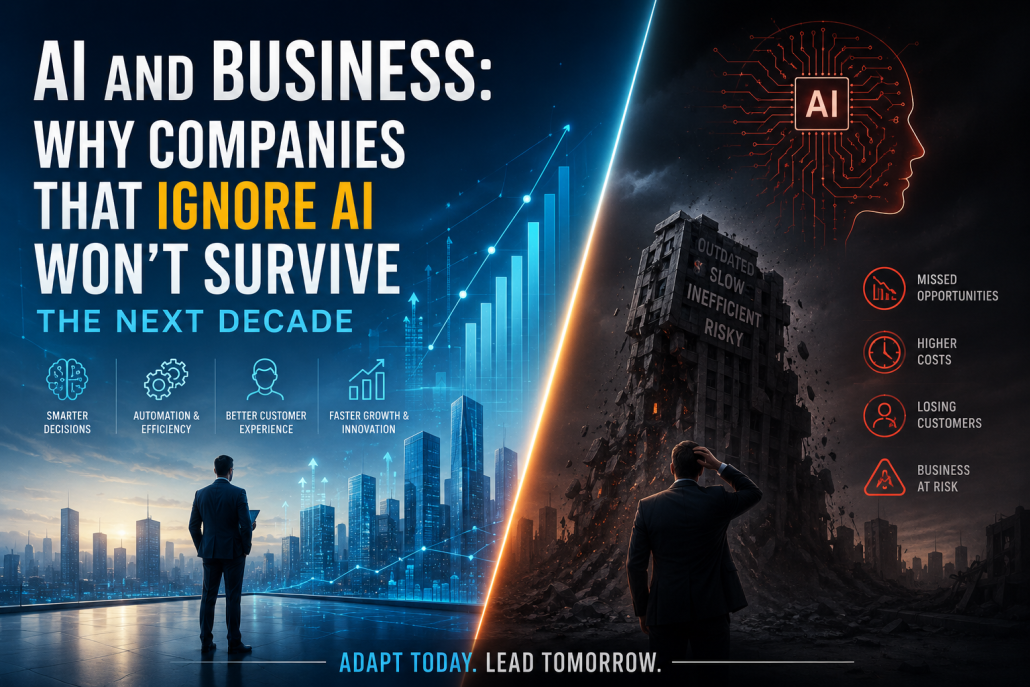
AI Is No Longer Optional: Why Businesses That Ignore It May Not Survive the Next Decade

Business leader standing between two futures: an AI-powered growing city and a collapsing outdated business world, symbolizing the importance of AI adoption.

ai and business why companies that ignore ai won’t survive the next decade business has always rewarded those who adapt early and punish those who hesitate but ai is not just another technological upgrade it is a full restructuring of how companies think operate innovate and compete over the next 10 years the companies that thrive will be the ones that build ai into every corner of their operations the ones that resist will slowly fade unable to match the speed precision and intelligence of aidriven competitors the first major transformation lies in decision-m today leaders still rely heavily on intuition human analysis and delayed reporting but ai can scan millions of data points customer behavior market patterns supply chain signals financial risks and produce precise insights in seconds this means businesses can act faster test strategies quickly and avoid costly mistakes leaders who leverage ai will be able to anticipate changes instead of reacting late giving them a significant advantage over slower traditional companies next is automation every routine process data entry email routing customer inquiries reporting scheduling inventory monitoring invoice processing will be automated this doesn’t eliminate human workers it elevates them when ai handles the repetitive and predictable humans shift toward strategic creative and relational tasks companies that embrace automation will scale operations with leaner teams lower costs and higher consistency those that refuse will drown in inefficiency the customer experience will also change dramatically ai systems will engage customers with instant support personalized recommendations and emotional awareness whether someone visits a website uses an app or walks into a store ai will remember preferences predict needs and shape communication accordingly the companies that master this form of personalization will build emotional loyalty the ones that don’t will feel outdated compared to ai enhanced competitors product development will accelerate too ai can design new products test features simulate market response and analyze user feedback quickly businesses will innovate in cycles measured in days not months prototyping becomes faster user testing becomes smarter product teams become more imaginative because ai handles the technical heavy lifting this allows companies to bring better products to market ahead of competitors supply chains will become intelligent networks ai will track inventory in real time predict shortages optimize deliveries and recommend pricing adjustments disruptions from weather shifts to supplier delays will be handled automatically by predictive models companies using ai powered supply chains will deliver faster waste less and save more marketing will undergo its own revolution ai will analyze trends customize campaigns generate ads write scripts and run experiments brands will reach the right audience at the perfect moment with messaging tailored to each customer marketing teams will focus on brand strategy while ai executes the mechanics the result is growth at a speed manual teams cannot match cyber security will become a frontline priority as threats evolve traditional firewalls and manual monitoring are no longer enough ai powered systems will detect anomalies instantly isolate attacks and protect sensitive data without waiting for human intervention companies without ai security will face breaches that destroy trust and reputation the workforce will evolve employees will need creativity emotional intelligence problem solving collaboration and ai literacy the most successful companies will invest in training helping workers become ai supervisors orchestrators and strategic thinkers the least successful companies will cling to old systems until they collapse under competition the reality is simple ai is no longer optional it is the new foundation of business companies that embrace it will rise companies that ignore it won’t survive

AI Assistants vs AI Agents: How They Shape the Future of Work

Imagine a movie star who works with both a personal assistant and a professional agent. The assistant helps with daily tasks such as managing the calendar, answering messages, booking meetings, and keeping life organized. The agent, however, works more proactively. They search for new opportunities, negotiate deals, plan the star’s career path, and make strategic decisions. Artificial intelligence works in a similar way. There are AI assistants and AI agents, and although they may sound similar, they play very different roles.

AI assistants are mostly reactive. They wait for a command from the user before taking action. Tools like Siri, Alexa, and ChatGPT are common examples. A user asks a question, gives an instruction, or writes a prompt, and the assistant responds. These systems are useful because they can understand natural language, organize information, answer customer questions, summarize text, write content, and even help generate code. However, they usually need clear direction. The user must guide the conversation step by step, almost like a tennis match: prompt, response, prompt, response.

Most AI assistants are powered by large language models, often called LLMs. These models help the assistant understand language and produce useful answers. Their quality can improve through techniques like prompt tuning and fine-tuning. Prompt tuning helps adjust the assistant for a specific task, while fine-tuning trains it with examples so it can perform repeated tasks more accurately. For example, a business may fine-tune an AI assistant to write customer emails in the company’s tone.

AI agents are different because they are more proactive. They do not just wait for every small instruction. Instead, they can take an initial goal and work toward it independently. For example, a company might tell an AI agent, “Improve our sales strategy.” The agent can then break that goal into smaller tasks, analyze data, compare customer behavior, suggest improvements, and even use external tools to complete parts of the work.

This makes AI agents more suitable for complex and strategic tasks. In finance, an AI agent might analyze market trends, news, and historical data to support automated trading decisions. In IT, an agent could monitor a network, detect problems, and suggest fixes before a major failure happens. Unlike simple assistants, agents can often use memory, tools, and external data sources to improve their decisions over time.

The difference is simple: AI assistants help with routine work, while AI agents aim to achieve bigger goals. An assistant might answer a customer question. An agent might study thousands of customer interactions and recommend a better support strategy.

Still, both systems have limits. AI assistants can misunderstand unclear prompts. AI agents can sometimes follow the wrong path, repeat mistakes, or require high computing power. Because of this, human supervision is still important. Businesses should not blindly trust every AI output.

In the future, the strongest results will likely come from combining both. AI assistants will handle daily tasks, while AI agents will manage larger workflows. Together, they can help people work faster, make smarter decisions, and focus more on creative and strategic work.

Why Businesses That Ignore AI May Fall Behind Faster Than They Think

Artificial intelligence is no longer a future technology reserved for large corporations. It has quickly become a practical tool that businesses of all sizes can use to improve efficiency, reduce costs, and make better decisions. Yet many companies still hesitate. Some believe AI is too expensive, too complex, or simply unnecessary for their industry. The problem is that ignoring AI today may create bigger risks tomorrow. In many markets, businesses that delay adoption are already starting to fall behind faster than they realize.

One of the main reasons is speed. AI helps companies work faster by automating repetitive tasks. A customer support team, for example, can use AI chatbots to answer common questions instantly instead of relying entirely on human staff. This saves time and improves response speed. Imagine two businesses selling similar products online. One replies to customer questions in seconds through AI, while the other takes hours. Most customers will naturally move toward the faster experience. Over time, that speed advantage turns into stronger customer loyalty and more sales.

AI also improves decision-making. Businesses create huge amounts of data every day—sales reports, customer behavior, website traffic, and market trends. Without AI, much of this data stays unused or takes too long to analyze. AI can detect patterns, predict demand, and identify problems before they grow. A retail company, for instance, can use AI to forecast which products will sell more next month. That means better inventory planning and less wasted money. Companies that ignore this advantage often make slower and weaker decisions.

Another major factor is personalization. Modern customers expect businesses to understand their needs. Platforms like Amazon and Spotify have shaped this expectation through recommendation systems. AI allows businesses to offer tailored suggestions, personalized emails, and targeted promotions. Without this, a company may feel outdated. Think about walking into two stores: one remembers what you like, and the other treats every visit the same. Most people will return to the first.

Competition is changing as well. Small businesses now have access to AI tools that were once only available to major companies. This means the market is becoming more efficient and more competitive at the same time. A smaller competitor using AI for marketing, analytics, and customer service can move faster than a larger traditional business. Size alone no longer guarantees advantage.

Of course, adopting AI does not mean replacing people or changing everything overnight. It often starts small—automating emails, improving website search, or analyzing customer behavior. The goal is not to remove human judgment but to strengthen it. Businesses that start early gain experience, learn faster, and adapt more easily.

In the end, ignoring AI is like ignoring the internet in the early 2000s. At first, it may seem optional. But over time, it becomes the standard. Businesses that wait too long may find themselves not just behind—but struggling to catch up at all.

AI and Consumer Behavior: How Buying Decisions Are Changin

AI and consumer behavior infographic showing personalized recommendations, smart search, AI chatbots, dynamic pricing, predictive shopping insights, and the customer buying journey.

Artificial intelligence is changing the way people make buying decisions, often in ways they do not even notice. In the past, consumers relied heavily on advertisements, word of mouth, or their own research before making a purchase. Today, AI has become a quiet partner in that process. From personalized product recommendations to smart chatbots and dynamic pricing, AI is shaping how people discover, compare, and choose products. This shift is changing consumer behavior and transforming the relationship between businesses and buyers.

One of the biggest ways AI affects buying behavior is through personalization. Platforms like Amazon and Netflix have made this common. When you browse products or watch content, AI analyzes your actions—what you click, how long you stay, and what you buy—to predict what you might want next. This makes shopping feel easier and faster. Imagine entering an online store and finding exactly what you were thinking about buying. That convenience often leads to quicker decisions and more purchases.

AI also changes how people search for information. Instead of scrolling through endless product pages, consumers increasingly interact with AI-powered search tools and assistants. A shopper looking for the best smartphone, for example, can ask an AI assistant to compare models, prices, and features in seconds. This reduces the time spent researching and can make decisions feel more confident. It also means businesses must focus on clear, accurate, and optimized product information because AI systems use that data to guide consumers.

Another important change is trust. AI-powered chatbots on websites can answer questions instantly, 24 hours a day. For many buyers, this creates a smoother experience. If someone is unsure about shipping, product compatibility, or return policies, getting an immediate answer can remove doubt. A small hesitation that once caused a customer to leave may now turn into a sale. In this way, AI helps bridge the gap between curiosity and commitment.

At the same time, AI introduces new challenges. Dynamic pricing, where prices change based on demand or behavior, can influence buyers in both positive and negative ways. A person might feel encouraged to buy quickly when they see a limited-time discount, but they may also feel manipulated if prices keep changing. Privacy is another concern. Many consumers know AI uses their data, and not everyone feels comfortable with that. Businesses must balance personalization with transparency.

The future of consumer behavior will likely become even more connected to AI. Voice shopping, predictive recommendations, and virtual assistants will continue to make buying faster and more tailored. Imagine your phone reminding you to reorder coffee before you run out, or suggesting a better product based on your habits. For businesses, this means understanding AI is no longer optional. It is becoming a key part of how people buy. In simple terms, AI is not just changing products—it is changing the psychology of purchasing itself.

Best APIs for Adding AI to Your Mobile or Web App

AI APIs have become one of the fastest ways for developers to add intelligent features into mobile and web applications without building complex machine learning systems from scratch. Instead of spending months training models, developers can connect their apps to powerful APIs and immediately unlock features like chatbots, image generation, search, voice recognition, and automation. This has changed the way software is built. Today, even a small startup can create advanced AI-powered products by choosing the right API.

One of the most widely used options is the API from OpenAI. It is popular because it offers strong natural language understanding, text generation, code assistance, summarization, and conversational AI. For example, if you want to build a customer support chatbot inside a shopping app, OpenAI can understand user questions, remember context, and provide useful answers. It is also flexible for content creation, translation, and workflow automation. Many developers choose it because the documentation is clear and integration is relatively simple.

Another strong option is the API from Google through its Google Gemini models. Gemini is especially useful for developers who need strong multimodal capabilities, meaning it can understand text, images, and other data together. Imagine a mobile app where a user uploads a photo of a broken machine and asks for troubleshooting advice. Gemini can analyze both the image and the text. It is also often attractive because of pricing and integration with Google Cloud services.

For apps focused on knowledge retrieval and real-time research, Perplexity AI offers an interesting API path. Unlike traditional models that rely heavily on training data, Perplexity emphasizes live web-backed responses. This makes it useful for applications where fresh information matters, such as market analysis, news tracking, or research assistants. For example, a financial app could use it to pull current trends and explain them to users.

Voice-based apps can benefit from APIs like ElevenLabs for realistic speech generation or speech cloning. This is valuable for language learning apps, accessibility tools, or interactive assistants. On the input side, speech recognition APIs from Google or Microsoft can convert spoken language into text, allowing hands-free interaction.

The best API depends on the goal of your app. If you need conversation and reasoning, OpenAI is often a strong choice. If you need image understanding and a broad ecosystem, Gemini may fit better. If your app depends on live information, Perplexity can be useful. A good way to think about it is like hiring specialists: one is a writer, one is a researcher, and one is a visual analyst. Choosing the right one can save time, reduce costs, and make your app far more powerful.