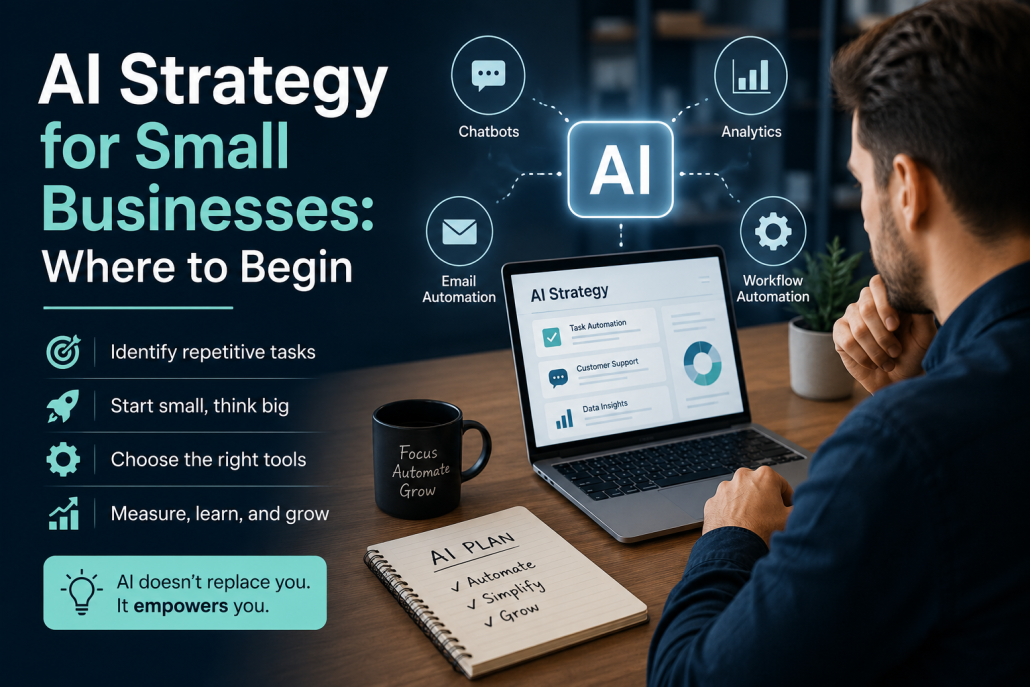
Artificial intelligence is no longer something only large companies can afford or understand. Today, small businesses can use AI to save time, improve customer service, and make better decisions. The real challenge is not whether to use AI, but where to begin.
The first step is to identify repetitive tasks. Every small business has them: answering common customer questions, managing emails, scheduling appointments, creating social media content, or organizing data. These are often the easiest places to introduce AI because they consume time but do not always require human creativity.
For example, a small online store can use AI chatbots to answer customer questions 24/7. A local marketing agency can use AI to generate content ideas or improve SEO. Even a small accounting office can use AI tools to sort invoices or summarize reports. The goal is not to replace people, but to reduce manual work.
The second step is to start small. Many businesses make the mistake of trying to automate everything at once. A better strategy is to choose one problem and solve it first. Think of it like testing a new employee: you give one task, measure the results, and expand from there.
Another important point is choosing the right tools. Platforms like OpenAI, Google Gemini, and Zapier offer practical solutions for businesses of all sizes.
In the end, AI strategy is less about technology and more about clarity. Small businesses should ask: What wastes our time? What slows our growth? What can be simplified? Starting with these questions makes AI practical, affordable, and powerful.
https://kiaapp.xyz/wp-content/uploads/2025/09/favicon2-4-300x200.png00Kiahttps://kiaapp.xyz/wp-content/uploads/2025/09/favicon2-4-300x200.pngKia2026-06-30 20:33:292026-09-17 09:52:14AI Strategy for Small Businesses: Where to Begin
https://kiaapp.xyz/wp-content/uploads/2025/09/favicon2-4-300x200.png00Kiahttps://kiaapp.xyz/wp-content/uploads/2025/09/favicon2-4-300x200.pngKia2026-06-30 19:52:042026-09-16 22:42:29AI + Business
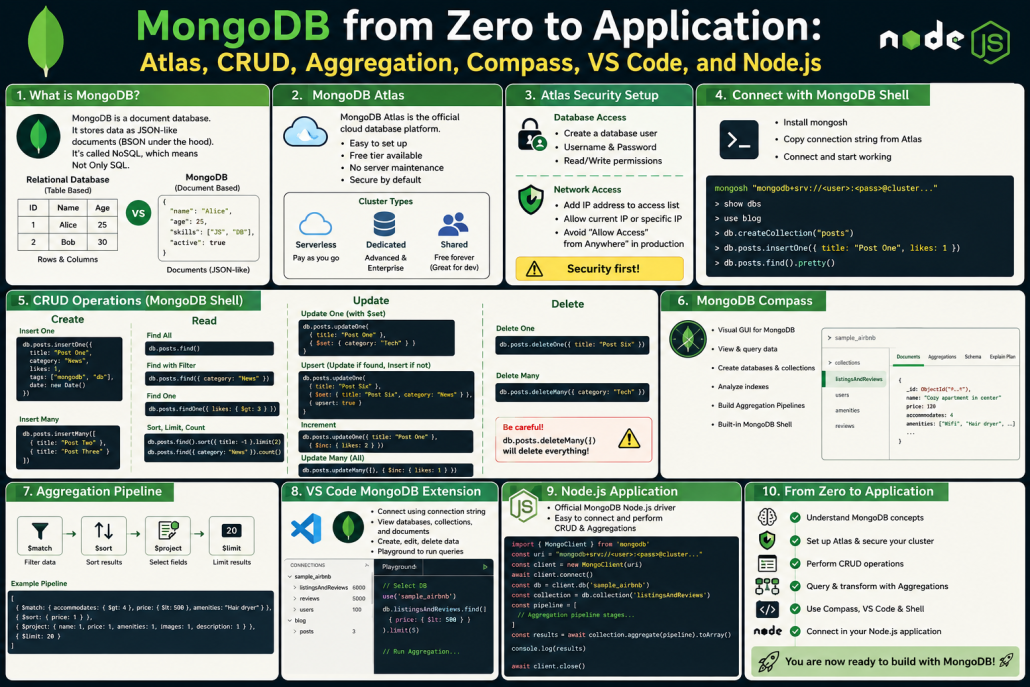
MongoDB Practical Beginner Guide: From Database Concepts to Node.js Integration
1. What MongoDB Is
MongoDB is often called a NoSQL database, but the better meaning is Not Only SQL, not “No SQL.”
The text explains that MongoDB is best understood as a document database. It stores data in documents that look like JSON, although internally MongoDB stores them as BSON.
Main idea:
MongoDB = Document Database
⸻
2. MongoDB vs Relational Databases
Relational databases store data like spreadsheets:
Tables → Rows → Columns
They need a strict schema before inserting data.
MongoDB works differently:
Database → Collection → Document
A document can store related data together, for example:
{
“title”: “Post One”,
“category”: “News”,
“tags”: [“MongoDB”, “Database”],
“likes”: 5
}
So instead of splitting data into many tables, MongoDB often keeps related data in one document.
⸻
3. JSON and BSON
Developers usually work with JSON-like data:
{
“name”: “Sara”,
“age”: 25
}
But MongoDB stores it internally as BSON.
BSON is like JSON, but with extra data types and better database performance.
⸻
4. Flexible Schema
MongoDB does not require a fixed schema by default.
That means documents in the same collection do not all need the exact same fields.
The tutorial shows the blog database and posts collection.
⸻
18. MongoDB Compass
MongoDB Compass is the visual desktop app for MongoDB.
It can be used to:
* View data
* Query data
* Create databases
* Create collections
* Analyze indexes
* Build aggregation pipelines
⸻
19. Sample Data
The tutorial loads MongoDB sample data.
One example is:
sample_airbnb
It contains rental listings, like Airbnb data.
This is used for practicing real queries.
⸻
20. Aggregation Pipeline
Aggregation lets you filter and transform data step by step.
Example goal:
Find rental listings that:
* Accommodate more than 4 people
* Cost less than 500
* Include a hair dryer
* Are sorted by price
* Show only needed fields
* Limit results to 20
Pipeline stages:
$match
$sort
$project
$limit
Important:
The order matters.
Good order:
Match → Sort → Project → Limit
⸻
21. VS Code MongoDB Extension
The tutorial also connects MongoDB to VS Code.
With the extension, you can:
* View databases
* View collections
* Open documents
* Create playgrounds
* Run queries inside VS Code
This makes MongoDB easier for developers working inside a code editor.
⸻
22. MongoDB Playground
A playground is like a practice file for MongoDB commands.
You can:
* Select a database
* Drop a collection
* Insert test data
* Run find queries
* Run aggregation pipelines
Useful for learning and testing before writing backend code.
⸻
23. Connecting MongoDB to Node.js
The tutorial ends by connecting MongoDB to a Node.js app.
Setup:
npm init -y
npm i mongodb
Basic flow:
Import MongoDB package
→ Create MongoClient
→ Connect with URI
→ Select database
→ Select collection
→ Run query or aggregation
Important production note:
The password should be stored in an environment variable, not directly in the code.
⸻
24. Final Understanding
The full context teaches MongoDB in this order:
Concepts
→ Atlas setup
→ Security
→ Shell connection
→ CRUD
→ Atlas dashboard
→ Compass
→ Aggregation
→ VS Code
→ Node.js app
https://kiaapp.xyz/wp-content/uploads/2025/09/favicon2-4-300x200.png00Kiahttps://kiaapp.xyz/wp-content/uploads/2025/09/favicon2-4-300x200.pngKia2026-06-29 10:01:262026-10-08 19:54:37MongoDB from Zero to Application: Atlas, CRUD, Aggregation, Compass, VS Code, and Node.js
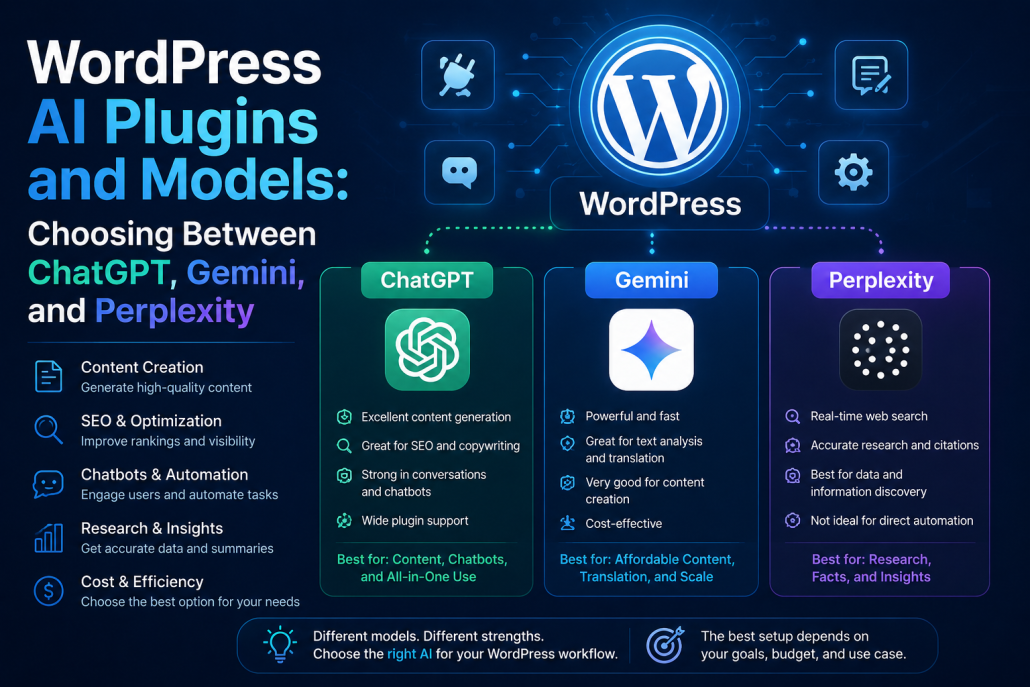
The effectiveness of these WordPress AI plugins depends heavily on which AI model you connect to them. ChatGPT, Gemini, and Perplexity each offer different advantages and trade-offs in areas like content quality, SEO, research, automation, and cost. Here’s how they compare in practice:
1. AI Engine
ChatGPT: Direct API integration using your API key. For example: you send a prompt → get an article, chatbot response, or summary.
Gemini: Supported via Google API. Useful for content generation, translation, and text analysis.
Perplexity: Usually no official direct support. It may work through custom endpoints if API access is available.
2. Rank Math SEO
ChatGPT: Mostly used for title suggestions, meta descriptions, and keyword clustering.
Gemini: Can work similarly if connected through API, although official integration is usually more limited.
Perplexity: Better for external research (like keyword discovery), not direct integration.
Example: “Best SEO title for AI article”
3. Bertha AI
This plugin usually runs on its own backend, so you do not directly choose the model.
Often:
GPT-based
Sometimes Claude-like models internally
Gemini or Perplexity usually do not connect directly.
4. Formidable Forms
ChatGPT: User submits a form → data is sent to GPT → AI returns a response.
Example:
User: “I need app development”
AI: “Do you need iOS, Android, or Web?”
Gemini: Same structure via API.
Perplexity: Less suitable because conversational form handling is not its main purpose.
5. Tidio
Usually uses its own internal AI model (Lyro AI).
But: It may use GPT in the backend.
Gemini: Usually no direct integration.
Perplexity: No.
6. Akismet
None of them.
It uses its own proprietary model, not GPT or Gemini.
Purpose: Pattern detection.
7. Sucuri Security
None of them.
AI here means threat intelligence and anomaly detection, not LLMs.
8. Voicer
ChatGPT: Usually generates the text, while Voicer converts it into audio.
Gemini: Can also generate text.
Perplexity: Can handle research + text generation.
But the voice engine itself is separate.
Flow: Perplexity → article → Voicer → audio.
9. AI Power
The strongest multi-model integration:
✅ ChatGPT ✅ Gemini ✅ Claude ✅ Sometimes custom APIs
Perplexity: Usually only through custom API.
This is the most flexible one.
10. All in One SEO
Similar to Rank Math:
ChatGPT: Title, meta, and content suggestions.
Gemini: Works if custom API support exists.
Perplexity: Good for research, but limited direct integration.
Simple summary:
For content generation: AI Engine + AI Power + Bertha (Best with ChatGPT/Gemini)
For SEO: Rank Math + All in One SEO (Best with ChatGPT)
For chatbot: AI Engine + Tidio (Best with ChatGPT)
For research: Perplexity is stronger than the others, but mostly outside WordPress.
Depending on your goals, different combinations may work better:
AI Engine + Gemini → lower cost and flexible
AI Power + ChatGPT → all-in-one solution
Perplexity + manual workflow → best for research-heavy articles
https://kiaapp.xyz/wp-content/uploads/2025/09/favicon2-4-300x200.png00Kiahttps://kiaapp.xyz/wp-content/uploads/2025/09/favicon2-4-300x200.pngKia2026-06-27 19:31:132026-09-17 23:20:36WordPress AI Plugins and Models: Choosing Between ChatGPT, Gemini, and Perplexity
Let’s go back for a moment to when we were 20 years old.
Think about that time — when we were just stepping into the real world, a world full of questions, fears, hopes, and choices. Back then, many of us didn’t know exactly what we wanted. And even if we did, the future didn’t change this fast.
But today?
Today, the future is moving at a speed no generation before us has truly experienced.
And the main reason for that acceleration is one thing:
Artificial Intelligence.
AI feels like a fast-forward button for human civilization.
Things that once took years can now be built in weeks. Ideas that once required an entire company can now be executed by one person with one laptop.
Programming, design, research, analysis, content creation, education, marketing — everything is being redefined.
But the real question is not:
What can AI do?
The real question is:
What will we do in a world where AI does most of the work?
History has taught us one thing:
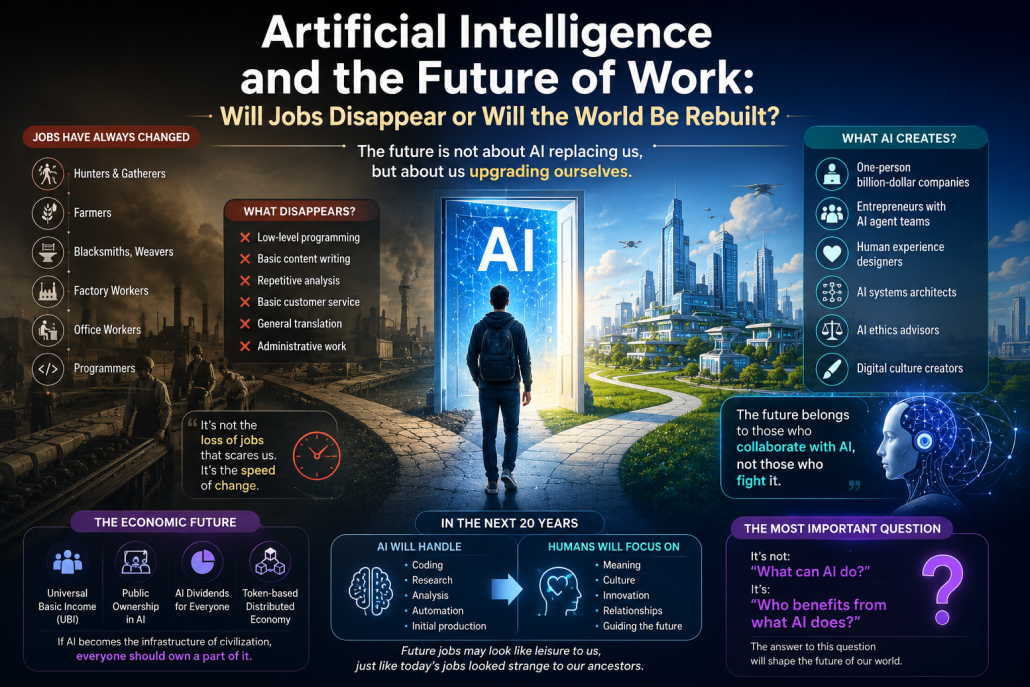
Jobs have always disappeared.
Once we were hunters. Then farmers. Then blacksmiths, weavers, factory workers, office workers, programmers.
Every wave of technology has erased jobs.
But every time, it created even more.
So the real issue is not job loss.
The real issue is the speed of change.
And AI is the fastest wave in human history.
What makes AI different from every tool before it?
The iPhone was a tool. The internet was a network. The steam engine was a machine.
But AI?
AI is the first tool that can think, decide, learn, and even build new tools.
That means we are no longer just building tools.
We are building the builder of builders.
And that is one of the most fundamental shifts in human history.
Should we be afraid?
Yes… and no.
Yes, because many current jobs will likely disappear:
Low-level programming
Basic content writing
Repetitive analysis
Basic customer service
General translation
Administrative work
But no, because AI does not only destroy jobs — it creates them too.
In the near future, the world may be filled with:
Billion-dollar one-person companies
Independent entrepreneurs managing teams of AI agents
Human experience designers
AI systems architects
AI ethics advisors
Digital culture creators
Who does the future belong to?
Not to those who fight AI.
But to those who collaborate with it.
In the future, knowledge alone will no longer be a competitive advantage.
Because AI will make knowledge accessible to everyone.
The true advantage will be:
Creativity
Judgment
Vision
Taste
Ethics
Leadership
Human connection
These are the things machines struggle to imitate.
What happens to the economy?
This may be the biggest question.
If only a few companies own the most powerful AI models, wealth will concentrate into very few hands.
And that is dangerous.
The future may move toward models like:
Universal Basic Income (UBI)
Public ownership in AI systems
AI dividends for everyone
Token-based distributed ownership economies
Because if AI becomes the infrastructure of civilization, everyone should own a part of it.
My prediction?
In the next 20 years:
AI will handle:
Coding
Research
Analysis
Automation
Initial production
And humans will focus more on:
Meaning
Culture
Innovation
Relationships
Guiding the future
Future jobs may look like leisure to us.
Just like today’s jobs would have looked strange to our ancestors.
And in the end, the most important question of the future will not be:
“What can AI do?”
It will be:
“Who benefits from what AI does?”
And the answer to that question will shape the future of our world.
https://kiaapp.xyz/wp-content/uploads/2025/09/favicon2-4-300x200.png00Kiahttps://kiaapp.xyz/wp-content/uploads/2025/09/favicon2-4-300x200.pngKia2026-06-26 12:57:012026-09-17 10:14:24Artificial Intelligence and the Future of Work: Will Jobs Disappear or Will the World Be Rebuilt?
real leadership, live experiences, culture — these become more
valuable, not less. When everything can be generated, authenticity
becomes luxury.
So my prediction is a hybrid future:
AI handles coding, logistics, research, and repetitive analysis.
Humans focus on vision, ethics, culture, relationships, and creating
meaning.
Money will still exist. But ownership may become more distributed,
tokenized, and linked to AI itself.
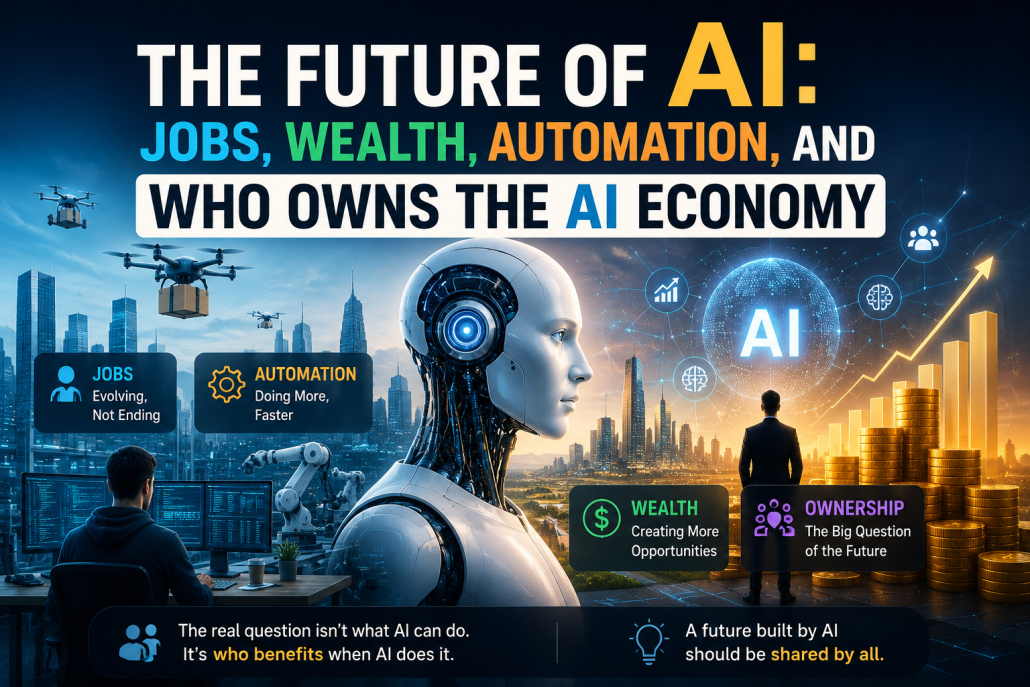
The biggest question of the next 20 years will not be:
“What can AI do?”
It will be: “Who benefits when AI does it?”
That is the real economic, political, and human challenge of the AI
age.
https://kiaapp.xyz/wp-content/uploads/2025/09/favicon2-4-300x200.png00Kiahttps://kiaapp.xyz/wp-content/uploads/2025/09/favicon2-4-300x200.pngKia2026-06-26 09:19:082026-09-17 22:32:09The Future of AI: Jobs, Wealth, Automation, and Who Owns the AI Economy
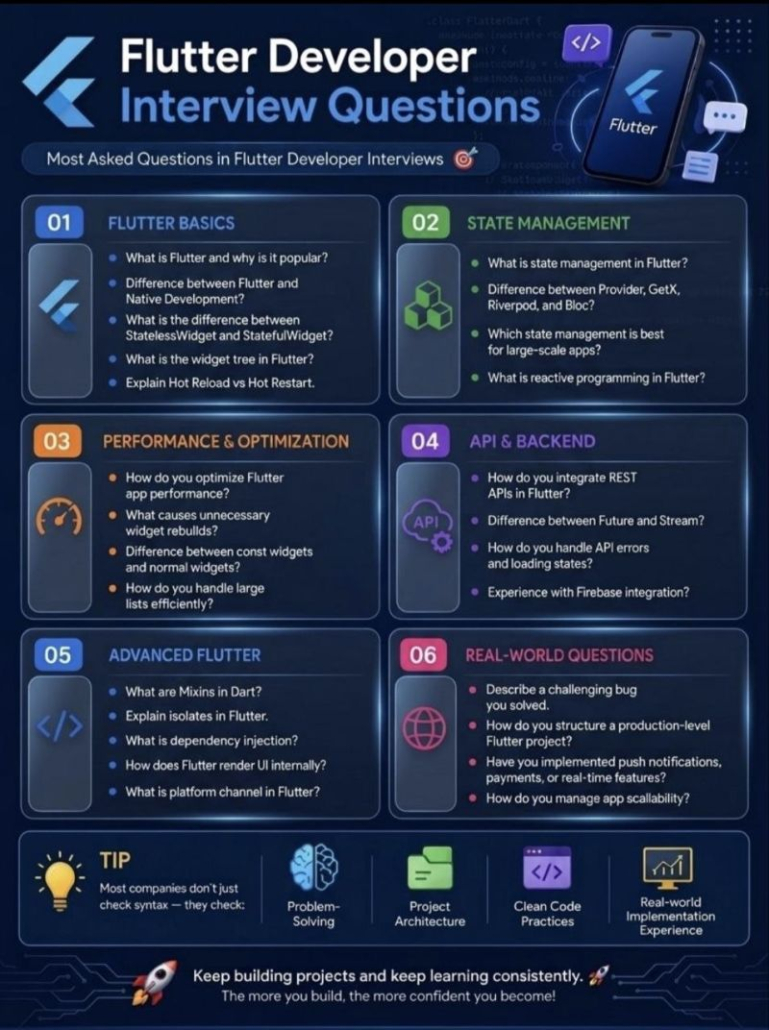
Flutter is Google’s open-source UI toolkit used for building cross-platform applications from a single codebase. It allows developers to create apps for iOS, Android, web, and desktop with native-like performance. Its biggest advantage is faster development and a consistent UI across platforms.
Flutter vs Native Development
Flutter uses one codebase for multiple platforms, while native development needs separate codebases. For example, iOS uses Swift and Android uses Kotlin/Java. Flutter saves time and cost, but native can sometimes give deeper platform-specific control.
StatelessWidget vs StatefulWidget
A StatelessWidget is immutable, meaning its data cannot change after creation. A StatefulWidget can update dynamically during runtime using state changes. For example, a text label is stateless, but a counter button is stateful.
What is the Widget Tree?
The Widget Tree is the structure of all widgets in an app, organized hierarchically. Everything in Flutter is a widget, from buttons to padding. Understanding the widget tree helps optimize UI and performance.
Hot Reload vs Hot Restart
Hot Reload updates code instantly without losing app state. It is useful for quick UI changes during development. Hot Restart rebuilds the whole app and resets everything.
2. State Management
What is State Management?
State management controls how data flows and updates inside an app. It ensures UI changes when the data changes. Without proper state management, apps become hard to maintain.
Provider vs GetX vs Riverpod vs Bloc
Provider is simple and beginner-friendly. GetX is lightweight and easy to use with less boilerplate. Riverpod is more flexible, and Bloc is best for large structured applications.
Best for large-scale apps?
For enterprise-level apps, Bloc and Riverpod are often preferred. They provide better separation of concerns and scalability. This makes the code easier to maintain in bigger teams.
What is Reactive Programming?
Reactive programming means the UI reacts automatically to data changes. Instead of manually updating widgets, Flutter listens for state changes. This creates smoother and cleaner app behavior.
3. Performance & Optimization
How do you optimize Flutter app performance?
Use const widgets, optimize images, reduce widget rebuilds, and lazy-load data. Also, use efficient state management and avoid unnecessary logic inside build methods. Profiling tools like Flutter DevTools help find performance bottlenecks.
What causes unnecessary widget rebuilds?
Improper use of setState() can rebuild too many widgets. Poor widget tree design also increases rebuilds. Breaking UI into smaller widgets helps reduce this.
Difference between const and normal widgets
Const widgets are compiled once and reused. This reduces memory usage and improves rendering speed. Normal widgets are recreated every time they rebuild.
How do you handle large lists efficiently?
Use ListView.builder for lazy loading. It only builds visible items instead of all at once. Pagination is useful for very large datasets from APIs.
4. API & Backend
How do you integrate REST APIs in Flutter?
Usually with packages like http or dio. The app sends requests and receives JSON data from the backend. Then we parse the JSON into models.
Future vs Stream
A Future returns one value once in the future. A Stream can return multiple values over time. For example, API calls use Future, chat apps use Stream.
How do you handle API errors and loading states?
Use try-catch for exceptions and display loading indicators. Show proper error messages for better user experience. Retry mechanisms improve reliability.
Experience with Firebase?
Firebase provides ready-to-use backend tools. I’ve used it for authentication, Firestore, notifications, and storage. It is especially useful for MVPs and real-time apps.
5. Advanced Flutter
What are Mixins in Dart?
Mixins allow sharing code between multiple classes. They avoid deep inheritance structures. For example, animation controllers often use mixins.
What are Isolates?
Isolates run heavy tasks in separate memory threads. This prevents blocking the main UI thread. Useful for JSON parsing or large computations.
What is Dependency Injection?
Dependency Injection means providing dependencies from outside a class. This makes code more modular and testable. Packages like GetIt are commonly used for this.
How does Flutter render UI internally?
Flutter uses its own rendering engine called Skia. It draws every pixel directly instead of using native components. This is why Flutter UI looks consistent across platforms.
What is Platform Channel?
Platform Channels let Flutter communicate with native code. For example, accessing battery info or camera features. It bridges Dart with Swift, Kotlin, or Java.
6. Real-world Questions
Describe a challenging bug you solved
A common example is fixing state synchronization issues after API calls. I debugged logs, checked async flows, and improved state handling. The solution made the app more stable and responsive.
How do you structure a production-level Flutter project?
I separate code into layers like UI, business logic, and data. Folders usually include screens, widgets, models, services, and repositories. This improves readability and teamwork.
Have you implemented push notifications, payments, or real-time features?
Yes, using Firebase Cloud Messaging for notifications. Stripe for payments and Firebase/WebSockets for real-time updates. These are common requirements in modern apps.
How do you manage app scalability?
By following clean architecture and modular design. Using proper state management and reusable components is important. Also, backend scalability and testing are critical for growth. Questions
https://kiaapp.xyz/wp-content/uploads/2025/09/favicon2-4-300x200.png00Kiahttps://kiaapp.xyz/wp-content/uploads/2025/09/favicon2-4-300x200.pngKia2026-06-26 08:47:272026-09-17 18:58:47Flutter Developer Interview Questions and Answers
waiting for bank approvals, and registering ownership. With a smart
contract:
The buyer deposits the agreed amount.
The blockchain verifies the payment.
Ownership is transferred automatically.
This reduces time, cost, and complexity.
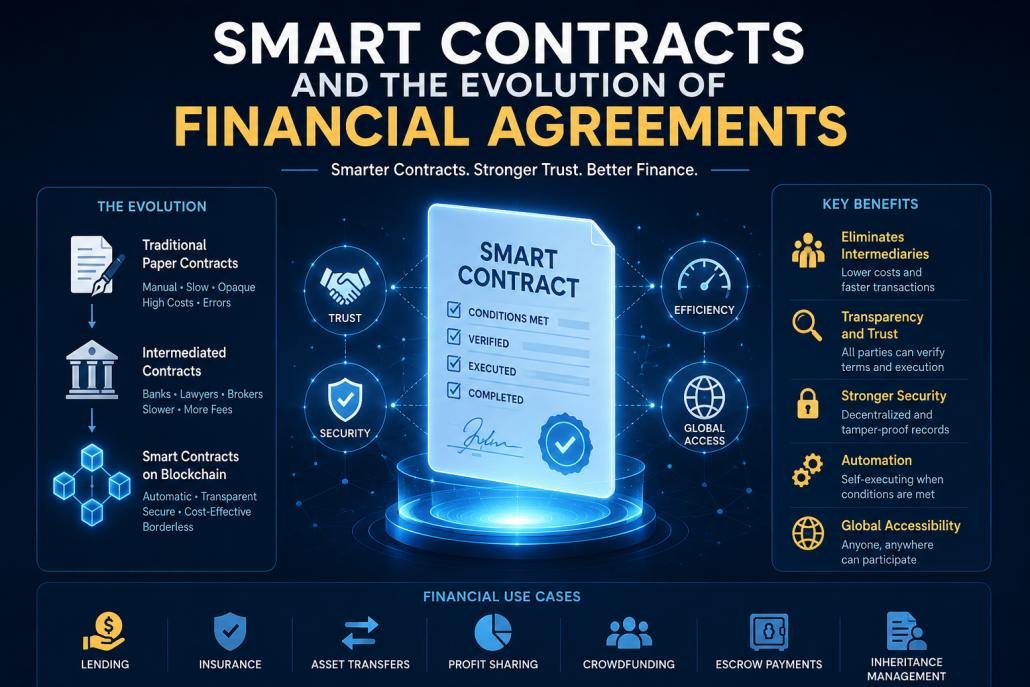
Advantages of Smart Contracts in Financial Transactions
1. Elimination of Intermediaries
One of the biggest advantages is removing unnecessary
middlemen. Banks, notaries, and brokers can be minimized.
This leads to:
Lower fees
Faster transactions
Less bureaucracy
For example, international wire transfers that usually take days can
be completed within minutes.
2. Transparency and Trust
Every transaction is permanently recorded on the blockchain. Both
parties can verify the contract terms and execution.
In lending, for instance, the borrower and lender can clearly see
repayment schedules, penalties, and collateral terms without
hidden clauses.
This transparency builds trust.
3. Improved Security
Because blockchain records are decentralized and immutable,
altering a smart contract after deployment is extremely difficult.
This makes fraud, tampering, and document manipulation much
harder compared to traditional paper contracts.
4. Automation and Efficiency
Smart contracts can automate repetitive financial tasks.
For example:
Loan repayments can be deducted automatically.
Insurance claims can be triggered instantly.
Dividends can be distributed without manual processing.
Imagine a travel insurance policy: if your flight is delayed, the
system can automatically detect it and pay compensation
immediately.
5. Global Accessibility
Smart contracts are borderless. Anyone with internet access can
participate.
A person in Greece, Iran, or Germany can enter the same
agreement without depending on local banks or regulators.
This creates more inclusive financial systems.
Disadvantages and Risks
1. Coding Vulnerabilities
A smart contract is only as good as its code. If there is a bug, the
consequences can be severe.
A famous example is the The DAO Hack, where millions were lost
due to a flaw.
2. Lack of Human Judgment
Life is complex. Contracts often need interpretation, negotiation, or
empathy.
Smart contracts cannot understand special circumstances like
illness, emergencies, or force majeure.
3. Legal Uncertainty
In many countries, the legal framework around Decentralized
Finance is still unclear.
If disputes arise, courts may struggle to enforce or interpret
blockchain contracts.
4. Dependence on Oracles
Smart contracts often depend on Blockchain Oracle for real-
world information such as exchange rates, gold prices, or weather
data.
If the oracle is corrupted or inaccurate, the contract may fail.
5. Irreversible Transactions
Mistakes are difficult to fix. If funds are sent incorrectly, they usually
cannot be recovered.
This makes precision extremely important.
Best Use Cases in Finance
Smart contracts are especially useful for:
Automated lending
Insurance settlements
Escrow services
Asset tokenization
Profit-sharing agreements
Inheritance planning
Crowdfunding platforms
Final Thought
Smart contracts offer a powerful combination of speed, security,
and transparency. They reduce costs and make financial systems
more efficient. But they also introduce technical and legal risks.
That is why many experts prefer a hybrid model:
Smart Contract + Human Oversight
This approach combines automation with human judgment,
creating a safer and more balanced financial system for the future
https://kiaapp.xyz/wp-content/uploads/2025/09/favicon2-4-300x200.png00Kiahttps://kiaapp.xyz/wp-content/uploads/2025/09/favicon2-4-300x200.pngKia2026-06-24 12:39:042026-09-17 22:02:23Smart Contracts and the Evolution of Financial Agreements
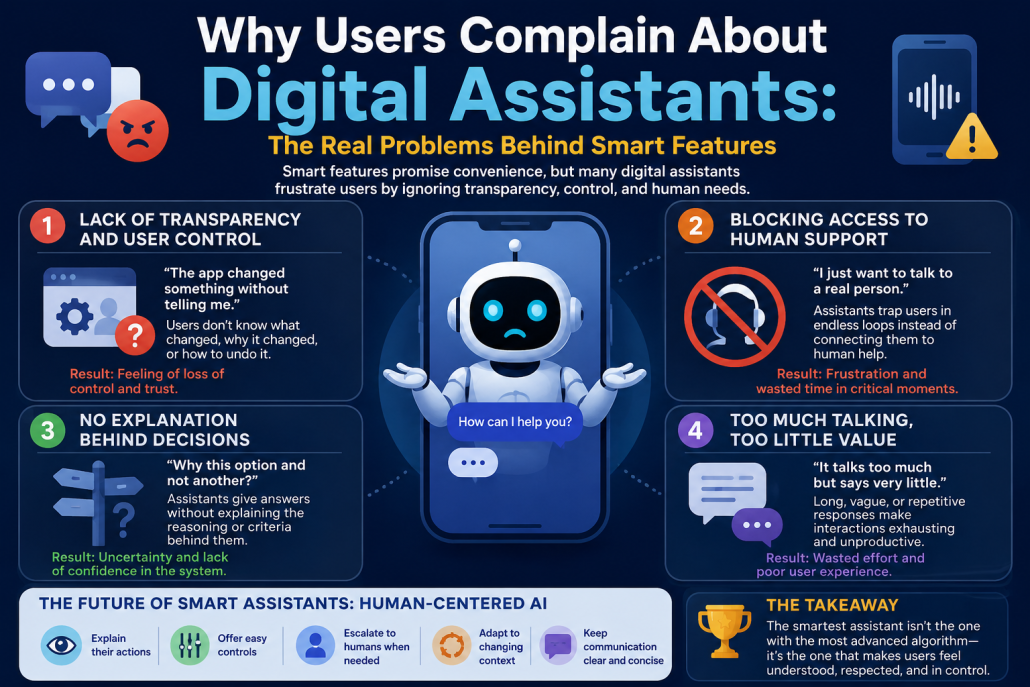
Based on the insights from [KiaApp’s analysis of smart features](https://kiaapp.xyz/smart-features-in-apps-recommendations-assistants-and-automation/), user frustration with digital assistants often stems from a gap between advanced technology and human expectations. When an assistant fails, it isn’t usually due to a lack of technical capability, but rather a failure to respect user autonomy.
The most critical user complaints center around a loss of agency, communication barriers, and a total lack of rationale behind automated choices.
—
### 1. The Total Illusion of Transparency and Control
The absolute core of user frustration lies in what the KiaApp text highlights: *”Users are generally open to intelligent behavior, but they want to know what is happening and why.”* Too often, digital assistants act as black boxes. They alter settings, categorize data, log personal information, or trigger automated workflows behind the scenes without explicit user consent. When an assistant makes an executive decision without explaining its logic, it ceases to feel like a helpful tool and begins to feel like an intrusive force.
True utility requires control. Users need a straightforward way to **correct, pause, or completely deactivate** specific behaviors. When an app denies them the ability to override a bad decision or fine-tune the assistant’s boundaries, it breeds anxiety. Advanced engineering means nothing if the interface feels entirely disrespectful of the user’s intent.
### 2. Acting as an Impenetrable Barrier to Human Help
Perhaps the most universally reviled experience is when an assistant transforms from a helpful guide into an unyielding gatekeeper. A dominant complaint among users is some variation of, *”I just want to talk to a human, but the app won’t let me.”*
This is especially damaging in high-stakes environments like banking, insurance, or healthcare, where users are often dealing with time-sensitive, complex crises. Instead of routing the user to a customer service representative, the digital assistant forces them through endless, cyclical troubleshooting loops.
By failing to recognize its own operational limitations, the assistant actively prevents resolution. When a system refuses to hand off the conversation to a human agent—or hides the option behind layers of menus—it fundamentally breaks user trust and turns a minor issue into a major source of resentment.
### 3. The Refusal to Explain “Why This and Not That?”
A distinct but deeply aggravating flaw in modern digital assistants is their utter failure to explain comparative decision-making. Assistants frequently present a single solution, recommendation, or path forward as an absolute truth, completely failing to justify why they selected that specific option over viable alternatives.
For example, if an assistant automatically selects a specific travel itinerary, a particular payment method, or a distinct workflow, it rarely explains the criteria used to make that choice. It doesn’t clarify if the decision was based on cost, efficiency, past user behavior, or a hidden algorithmic bias.
Because the assistant doesn’t explain its method, users cannot evaluate whether the logic matches their current priorities. Without this context, the assistant’s guidance feels arbitrary, leaving users to constantly second-guess the system rather than relying on it.
### 4. Repetitive Misunderstanding and Verbosity
To compound these systemic flaws, assistants are frequently criticized for being over-communicative yet unhelpful. Users often note that assistants **”talk too much but say very little,”** offering long, scripted, or vague responses instead of direct answers. When this verbosity is paired with a failure to grasp context—causing the system to repeatedly misunderstand a query even when rephrased—the interaction becomes an exhausting exercise in futility.
—
> **The Takeaway:** Digital assistants must evolve past simple automation. To genuinely assist, they must operate with absolute transparency, know when to step aside for human intervention, and explicitly communicate the “why” behind their decisions.
https://kiaapp.xyz/wp-content/uploads/2025/09/favicon2-4-300x200.png00Kiahttps://kiaapp.xyz/wp-content/uploads/2025/09/favicon2-4-300x200.pngKia2026-06-23 19:32:062026-09-17 23:11:57Why Users Complain About Digital Assistants