Hi! I am Kia, a dedicated app developer driven by a passion for crafting innovative and user-friendly applications. With expertise in Swift, Flutter, MongoDB, and various design tools, I possess the skills to transform ideas into exceptional digital experiences. Explore my services and portfolio to witness how I can bring your app ideas to life and exceed your expectations.
With expertise in app development, translation, and poetry, I bring a unique blend of creativity, linguistic proficiency, and artistry to my work. Having translated four self-help books while preserving their essence, and fueled by a passion for writing poetry, I strive to deliver captivating and inspiring digital experiences that engage users holistically.
Artificial intelligence is no longer something only large companies can afford or understand. Today, small businesses can use AI to save time, improve customer service, and make better decisions. The real challenge is not whether to use AI, but where to begin. The first step is to identify repetitive tasks. Every small business has them: […]
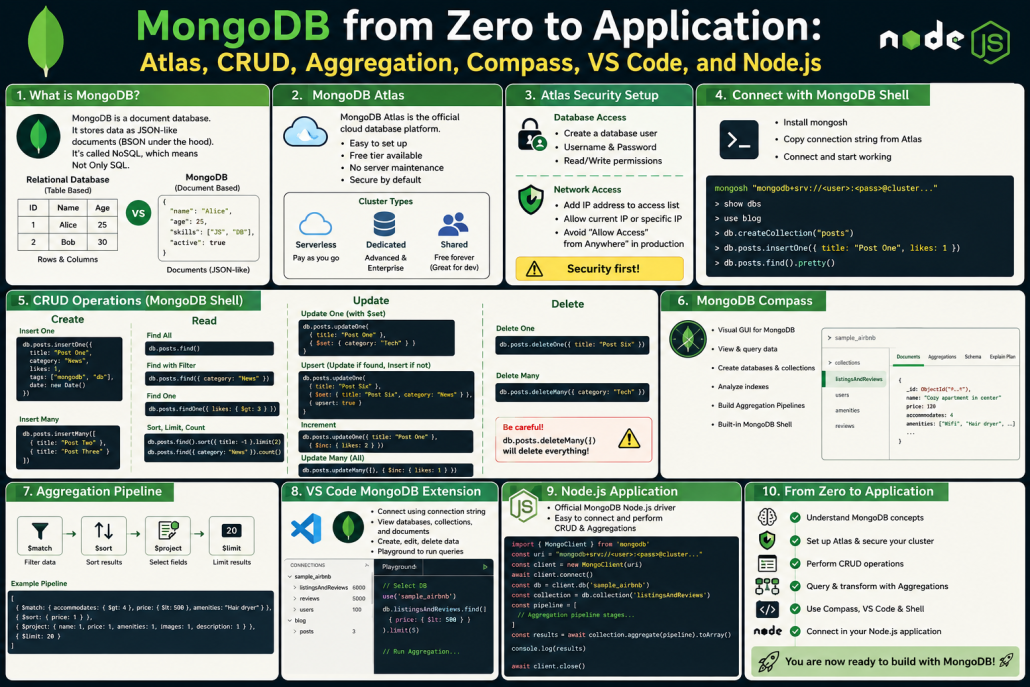
MongoDB Practical Beginner Guide: From Database Concepts to Node.js Integration
1. What MongoDB Is
MongoDB is often called a NoSQL database, but the better meaning is Not Only SQL, not “No SQL.”
The text explains that MongoDB is best understood as a document database. It stores data in documents that look like JSON, although internally MongoDB stores them as BSON.
Main idea:
MongoDB = Document Database
⸻
2. MongoDB vs Relational Databases
Relational databases store data like spreadsheets:
Tables → Rows → Columns
They need a strict schema before inserting data.
MongoDB works differently:
Database → Collection → Document
A document can store related data together, for example:
{
“title”: “Post One”,
“category”: “News”,
“tags”: [“MongoDB”, “Database”],
“likes”: 5
}
So instead of splitting data into many tables, MongoDB often keeps related data in one document.
⸻
3. JSON and BSON
Developers usually work with JSON-like data:
{
“name”: “Sara”,
“age”: 25
}
But MongoDB stores it internally as BSON.
BSON is like JSON, but with extra data types and better database performance.
⸻
4. Flexible Schema
MongoDB does not require a fixed schema by default.
That means documents in the same collection do not all need the exact same fields.
The effectiveness of these WordPress AI plugins depends heavily on which AI model you connect to them. ChatGPT, Gemini, and Perplexity each offer different advantages and trade-offs in areas like content quality, SEO, research, automation, and cost. Here’s how they compare in practice: 1. AI Engine ChatGPT: Direct API integration using your API key.For example: […]
Here’s the English presentation-style version: Let’s go back for a moment to when we were 20 years old. Think about that time — when we were just stepping into the real world, a world full of questions, fears, hopes, and choices.Back then, many of us didn’t know exactly what we wanted.And even if we did, […]
In today’s competitive e-commerce world, showing the right product to the right customer at the right time can make the difference between a sale and a missed opportunity. This is where AI Smart Product Recommendation becomes one of the most powerful tools for modern online stores. AI Smart Product Recommendation uses advanced artificial intelligence algorithms […]
AI feels like a fast-forward button for human progress. It accelerates technology, compresses time, and makes possibility move faster. Tasks that once took months can now take days; things that required teams can now be started by individuals. Information can be processed, structured, and deployed at extraordinary speed. But this raises the deepest question of […]
1. Flutter Basics What is Flutter? Flutter is Google’s open-source UI toolkit used for building cross-platform applications from a single codebase.It allows developers to create apps for iOS, Android, web, and desktop with native-like performance.Its biggest advantage is faster development and a consistent UI across platforms. Flutter vs Native Development Flutter uses one codebase for […]
If we connect this discussion to Smart Contract in finance, the topic becomes even more compelling, because it shows how artificial intelligence and blockchain can reshape traditional financial systems Hedera. What is a Smart Contract? A smart contract is a self-executing digital agreement stored on a Blockchain. Instead of relying on intermediaries like banks, lawyers, or brokers, the contract […]
Based on the insights from [KiaApp’s analysis of smart features](https://kiaapp.xyz/smart-features-in-apps-recommendations-assistants-and-automation/), user frustration with digital assistants often stems from a gap between advanced technology and human expectations. When an assistant fails, it isn’t usually due to a lack of technical capability, but rather a failure to respect user autonomy. The most critical user complaints center around […]