Entries by Kia

Comprehensive and Practical Guide to App Monetization Strategies: From Implementation to Sustainable Growth

In today’s dynamic market—where the global app industry has surpassed $430 billion annually—choosing a monetization model is no longer a simple business decision; it is a strategic necessity for economic survival. Although most apps are offered for free, achieving sustainable success in this red ocean requires precise engineering of revenue streams that not only ensure […]

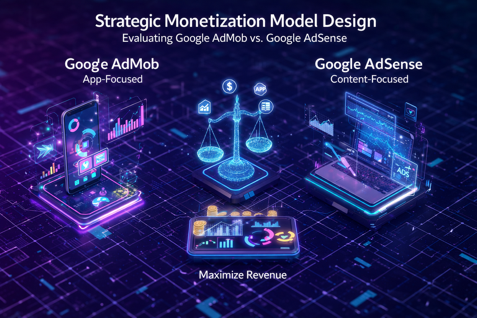
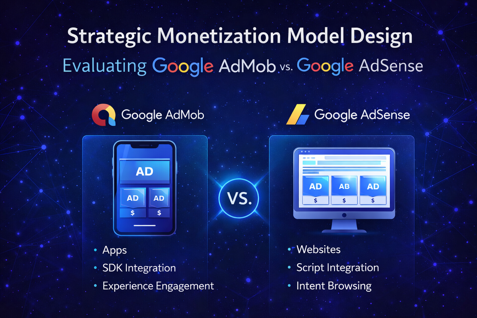
Strategic Monetization Model Design: Evaluating Google AdMob vs. Google AdSense

1. Strategic Framework and Introduction

Selecting an advertising platform is not merely a technical decision

 made at the end of the development pipeline; it represents the fiscal

 foundation and the primary determinant of unit economics in digital

 projects. This choice dictates both the technical architecture and the

 medium- to long-term growth strategy of the business. Ignoring the

 structural differences between these two platforms introduces

 significant risk to return on investment (ROI) and can lead to lock-in

 within inefficient monetization models.

The strategic objectives of this document are:

• Reengineering revenue streams based on the type of digital asset

 (App vs. Web).

• Maximizing Digital ARPU (Average Revenue Per User) through

 optimal platform selection.

• Evaluating the scalability of advertising infrastructure to support

 high-traffic volumes.

Understanding the distinction between content-centric and

 application-centric models is a strategic necessity. This distinction

 directly impacts the product lifecycle, as user acquisition (UA) models

 and retention costs differ fundamentally between applications and

 content platforms. The following sections provide a deep analysis of

 these two monetization poles.

2. In-Depth Analysis of Google AdMob: Focus on the App Economy

Google AdMob is not merely an ad network; it is a specialized

 ecosystem designed for app publishers, built on experience-based

 engagement. Unlike the web, the focus here is on retaining users

 within a controlled environment.

Strategic Capabilities of AdMob:

• SDK-based integration: Unlike web-based script integrations, AdMob

 operates through SDKs embedded within the application layer,

 enabling deeper interaction and greater technical stability.

• Granular targeting: By analyzing behavioral data, AdMob serves ads

 to users with the highest engagement potential, directly improving

 eCPM (effective cost per thousand impressions).

• Synergy with Firebase and Google Analytics: This integration is not

 merely technical; it is essential for calculating LTV (Lifetime Value).

 For investors and C-level stakeholders, accurate LTV tracking through

 Firebase forms the backbone of marketing budget allocation

 decisions.

The “So What?” Layer

Due to its application-centric nature, AdMob benefits from high DAU

 (Daily Active Users), offering significantly greater revenue potential

 than web platforms. Monetization in this model is driven by user

 engagement with tools or games. Failing to use AdMob in native

 applications means forfeiting a critical opportunity to optimize ROI

 through behavioral data.

3. In-Depth Analysis of Google AdSense: Focus on the Content

 Ecosystem

Google AdSense forms the backbone of web monetization models and

 operates on intent-based browsing. Value is created through

 information delivery, and advertising must complement the content

 flow.

Revenue Share Model

Google acts as a revenue partner, sharing income generated from

 clicks and impressions with content owners. This model is ideal for

 blogs, news sites, and YouTube channels.

Critical Limitation (E-commerce Exclusion)

According to Google standards, AdSense is not designed for e-

commerce or online stores. Its focus is on content-producing assets,

 not direct product sales.

Contextual Ad Formats

AdSense offers diverse formats that integrate seamlessly with content

 (native ads), minimizing disruption to user experience.

The “So What?” Layer

Strategic success with AdSense depends on balancing content

 production costs against advertising revenue. Low traffic is fatal in

 this model. Unlike applications—where fewer users with high

 engagement may still generate revenue—AdSense is highly dependent

 on scale and high-value keywords.

4. Comparative Evaluation and Revenue Model Analysis

For senior decision-makers, aligning asset type with platform choice is

 the most critical action. Misusing a platform (e.g., deploying AdSense

 within complex web apps) results in poor yield and degraded user experience.

Strategic Comparison Table

Evaluation Criteria Google AdMob Google AdSense

Target Asset Type Native mobile apps (iOS/Android) Content websites,

 blogs, YouTube

Technical Basis SDK integration Script integration

User Behavior Experience-based engagement Intent-based browsing

Revenue Potential Very high (DAU & impressions dependent)

 Moderate (CTR & keyword value dependent)

Key KPI Retention & impressions Content relevance & CTR

Strengths and Weaknesses

Google AdMob

• Strengths: High scalability, strong LTV tracking via Firebase, OS-level

 targeting.

• Weaknesses: Limited exclusively to app environments; ineffective on

 the open web.

Google AdSense

• Strengths: Access to the largest web advertiser network, rapid

 deployment on content platforms.

• Weaknesses: Highly sensitive to traffic volume; unsuitable for e-

commerce models.

5. Decision Roadmap and Long-Term Scalability

Business sustainability requires aligning digital assets with future

 growth objectives.

Decision Logic Guidelines:

• If your product is a mobile app: Choose AdMob immediately. Its SDK-

centric architecture is essential for optimizing mobile monetization

 and behavioral analytics.

• If your product is a content platform, blog, or YouTube channel:

 AdSense is the standard choice. However, if your site is an e-

commerce store, alternative monetization models must be explored.

Strategic Warning

Using AdSense for app-like experiences (e.g., complex web apps)

 typically results in low CTR and poor financial performance due to the

 lack of native integration.

Final Recommendations for Scalability:

• Prioritize traffic growth: Neither platform performs well at low scale.

 Focus on audience acquisition before ad optimization.

• Continuously monitor ARPU: Track revenue per user to ensure

 financial health against server and maintenance costs.

• Leverage analytics: In AdMob-based models, use Firebase data to

 personalize user experiences and extend session duration.

Final Statement

Precise alignment between platform and digital asset type is the

 primary lever for maximizing Digital ARPU and ensuring financial

 sustainability. Choosing the correct platform is not a technical

 preference—it is a strategic necessity for scalable growth in today’s

 competitive ecosystem.

App Release & Compliance Guide (2025)

1. Introduction: The Paradigm Shift in App Store Acceptance Standards (2025) In the hyper-competitive landscape of 2025, success on the App Store is no longer merely a technical achievement; it is the result of a cohesive pre-submission strategy. You must understand that Apple has adopted an extremely strict—and unapologetically ruthless—approach toward unfinished or insufficiently polished […]

omprehensive Compliance Program and App Store Release Roadmap (2025 Edition)

Comprehensive Compliance Program and App Store Release Roadmap (2025 Edition)

1. Introduction: The Paradigm Shift in 2025 Review Standards

In the ultra-competitive landscape of 2025, success on the App Store is no longer merely a technical achievement—it is the result of a coherent pre-submission strategy. You must understand that Apple has adopted an extremely strict and ruthless stance toward incomplete or “unpolished” applications this year. Passing Apple’s review process requires a precise combination of legal transparency, absolute respect for user privacy, and visual perfection. Conscious preparation before pressing the submit button is the only way to avoid exhausting rejection cycles and to protect your brand credibility.

An analysis of the strategic impact of Apple’s strictness shows that it is rooted in protecting the ecosystem and user experience. Submitting an app with visual or technical flaws is a strategic mistake that signals a lack of professionalism to Apple. When an app is rejected for basic issues, you not only lose time-to-market but also damage reviewer trust for future versions. In 2025, Apple has left no room for trial and error in the live App Store environment.

Technical stability is the cornerstone of this roadmap; without a solid foundation, even the best metadata will not prevent rejection.


2. Technical Quality Assurance and Final Testing (Technical Polishing)

Relying on emulators is absolutely insufficient for 2025 standards and represents a major risk. You are required to test your app in real-world conditions and on physical devices. The goal at this stage is to identify and fix bugs that do not appear in isolated development environments.

Operational Directive: Testing & Quality Checklist

  • Testing on physical devices: Use TestFlight to verify performance across different iPhone and iPad models.
  • Edge-case coverage: Carefully test behavior during network loss, low memory conditions, and system feature conflicts.
  • “Try to break it” strategy: Ask testers and beta teams to challenge the app with unconventional usage patterns.
  • Fix all identified bugs: Before submission, every issue—no matter how minor—must be resolved. Apple allows no exceptions.

Deep Analysis: Why reviewers are faster than you

Apple reviewers are specialists with institutional knowledge who have seen recurring failure patterns across thousands of apps. They are trained to identify edge cases that developers often overlook. Rejection due to basic bugs leads to an instant rejection, imposing significant operational costs on the team. Technical stability is the first trust test between you and Apple.

Once code stability is ensured, focus shifts to the storefront—the public reflection of your product’s internal quality.


3. Metadata Optimization and Storefront Strategy (Metadata & Visual Strategy)

Metadata is the first point of contact for both reviewers and users. Even the smallest inconsistency can cause approval delays or immediate rejection. Your storefront must go beyond listing features and clearly communicate problem-solving value.

Metadata Acceptance Standards (2025 Edition)

  • Screenshots: Must be high-resolution and correctly sized. Reusing old screenshots after UI changes is strictly prohibited.
  • Preview videos: Short, clear, and focused on real feature demonstrations; no misleading promotional content.
  • Name & keywords: Accurate, relevant, and non-repetitive. Keyword inconsistencies cause review delays.
  • Category & support URLs: Precise category selection and an active, valid support URL are mandatory.
  • Description: Avoid robotic language; focus on user problems and real value delivered by the app.

Value Justification Analysis

App descriptions should not be a copy-paste list of features. To build trust and increase conversion, speak directly to the user. Explain why the app exists and how it simplifies their life. A problem-solving focus differentiates your brand and supports Apple’s approval process.

Visual appeal and accurate metadata are meaningless without strict privacy compliance.


4. Privacy Justification Strategy and Sensitive Data Access

In 2025, privacy is not optional—it is a fundamental right that Apple protects obsessively. Any access to user data (camera, location, contacts, etc.) must be justified clearly, logically, and in user-friendly language.

Operational Directive: Writing Access Justifications

Unlike previous years, you must explain the reasons for sensitive data access not only in technical metadata but also clearly in the App Store description:

  • Location: Explain how location access benefits the user (e.g., navigation or local services).
  • Camera & Microphone: Explicitly state that access is required for essential functionality (e.g., document capture or voice calls).
  • Health Data: If using HealthKit, clearly specify how the data supports health insights for the user.

The “Privacy Philosophy” Layer

Requesting unnecessary permissions is a strategic error that leads to rejection. Only request data essential to app functionality. Transparency here is the foundation of trust.

Once data transparency is established, the next step is proving legal ownership and brand identity.


5. Legal Compliance and Brand Ownership Verification

One guaranteed cause of rejection is a mismatch between the developer account name and the app’s brand. If the app belongs to a company, it must be submitted through that company’s business account.

Legal Documentation and Preventive Actions

  • Identity alignment: Developer name and app brand must fully match. Otherwise, prepare legal documents in advance (contracts, company registration, or trademark certificates).
  • Document readiness: Have brand ownership documents ready before submission to avoid review delays if requested.
  • Policy updates: Apple’s rules change rapidly. Regularly review the Apple Developer Program, as last month’s valid rule may cause rejection today.

Successful submission is only the beginning; an app’s survival depends on smart post-launch management.


6. Post-Launch Management and Long-Term Compliance

A successful app in 2025 is a living entity, not a static product. Apple does not favor abandoned or stagnant apps and may deprioritize them in search results.

Operational Guidelines to Maintain Momentum

  • Monitoring as an alert system: User reviews are the earliest indicators of overlooked bugs—treat them as early warning signals.
  • Human presence and trust: Respond quickly and respectfully to reviews, especially negative ones. Showing that a real human cares builds strong trust and loyalty.
  • Continuous updates: Improve performance, fix bugs, and add features to keep the app alive.

Final Note

Remember that launching is a learning curve. If you face rejection, do not take it personally—each rejection is strategic feedback to improve your product. App Store success is the intersection of flawless engineering, legal transparency, and mutual trust with users.

Comprehensive Standard Operating Procedure (SOP) for Mobile App Release

 1. Objective and ScopeSuccessfully releasing a mobile application is far more than a simple technical task; it is a strategic maneuver that directly impacts brand credibility and return on investment (ROI). The purpose of this SOP is to establish a repeatable and preventive framework for managing the release lifecycle, minimizing costly delays during app store review processes. This guideline covers […]

iOS App Development Myths

This article addresses common misconceptions about outsourcing iOS app development and corrects them with practical, real-world insights. Key points to consider • Outsourcing is not inherently worse than local development Quality depends on the developer’s skill and commitment, not their location. Remote develop ers can be just as dedicated—or even more so. • Developers are […]

How We Built iOS & Android Apps for Our Business

In our daily business operations, we work with a wide range of industrial and building-related products. These include industrial valves, pumps and accessories, construction equipment, precision tools, piping and fittings, agricultural and gardening products, electrical supplies, and more. Traditionally, these products were presented and sold through desktop-based systems, catalogs, and websites. While this approach worked […]

Why We Built iOS and Android Apps for Our Business

In our daily business operations, we work with a wide range of industrial and building-related products. These include industrial valves, pumps and accessories, construction equipment, precision tools, piping and fittings, agricultural and gardening products, electrical supplies, and more. Traditionally, these products were presented and sold through desktop-based systems, catalogs, and websites. While this approach worked […]

How We Build Real Business Apps — The Right Way

Building a real-world application is rarely a straight line. In theory, frameworks and tools promise speed and simplicity. In practice, real projects evolve through trial, mistakes, and informed decisions. This article explains how we actually build apps for businesses, based on hands-on experience—not marketing slogans. Our focus is on stability, maintainability, and long-term value rather […]

SwiftUI vs Flutter — When to Use Each

Choosing the right framework for mobile app development is one of
the most important technical decisions a business or startup can make.
Two of the most popular modern options today are SwiftUI and Flutter.
Both are powerful, actively developed, and backed by large
companies—Apple and Google. Yet, they are designed with very
different philosophies in mind.
In this article, we’ll compare SwiftUI and Flutter from a practical, real-
world perspective. Instead of marketing claims, we’ll focus on when
each framework truly makes sense, based on product goals, team
structure, performance needs, and long-term maintenance.
⸻⸻⸻⸻⸻⸻⸻⸻⸻⸻⸻
What Is SwiftUI?
SwiftUI is Apple’s modern UI framework for building applications
across iOS, iPadOS, macOS, watchOS, and tvOS. It was introduced in
2019 and is deeply integrated into Apple’s ecosystem.
SwiftUI uses a declarative syntax, meaning you describe what the UI
should look like, not how to draw it step by step. The system
automatically updates the interface when data changes.
Key strengths of SwiftUI
• Native Apple performance
• Deep integration with iOS APIs
• Clean, readable syntax
• Long-term support from Apple
• Ideal for Apple-only apps
SwiftUI feels like the “official” way Apple wants developers to build
modern apps going forward.
⸻⸻⸻⸻⸻⸻⸻⸻⸻⸻⸻
What Is Flutter?
Flutter is Google’s open-source UI framework for building
applications from a single codebase. With Flutter, you can target iOS,
Android, web, and desktop using the same code.
Flutter uses the Dart programming language and renders UI using its
own high-performance engine. This gives developers full control over
the look and behavior of the interface, regardless of platform.
Key strengths of Flutter
• One codebase for multiple platforms
• Consistent UI across devices
• Fast development cycles
• Strong community and plugin ecosystem
• Great for startups and MVPs
Flutter is designed for speed, flexibility, and cross-platform consistency.
⸻⸻⸻⸻⸻⸻⸻⸻⸻⸻⸻
Performance: Native vs Cross-Platform
Performance is often the first concern when comparing these two.
SwiftUI runs fully natively. It uses Apple’s frameworks directly and
benefits from system-level optimizations. For animation-heavy apps,
complex gestures, or deep hardware integration, SwiftUI has a natural
advantage.
Flutter, while not native in the traditional sense, is still very fast. Its
rendering engine draws directly to the screen, avoiding many
traditional cross-platform bottlenecks. In most business applications,
users will not notice a performance difference.
Rule of thumb:
• If maximum native performance is critical → SwiftUI
• If performance must be “good enough” across platforms → Flutter
⸻⸻⸻⸻⸻⸻⸻⸻⸻⸻⸻
Development Speed and Productivity
This is where Flutter often shines.
With Flutter:
• One team writes one codebase
• Features ship simultaneously on iOS and Android
• UI behaves consistently everywhere
• Hot reload speeds up iteration
SwiftUI development is also fast, but only within the Apple ecosystem.
If you need Android later, you must build a second app from scratch
(or with a different team).
For startups, MVPs, and budget-sensitive projects, Flutter can
significantly reduce time-to-market.
⸻⸻⸻⸻⸻⸻⸻⸻⸻⸻⸻
UI and Design Flexibility
SwiftUI follows Apple’s Human Interface Guidelines closely. This is a strength and a limitation.
• You get a UI that feels “right” on iOS
• But heavy customization can be harder
• Platform-specific behavior is expected
Flutter, on the other hand, is extremely flexible:
• Pixel-perfect custom designs
• Same UI across all platforms
• Full control over animations and layouts
If brand consistency across platforms matters more than native look-
and-feel, Flutter is often the better choice.
⸻⸻⸻⸻⸻⸻⸻⸻⸻⸻⸻
Ecosystem and Long-Term Maintenance
SwiftUI
• Backed by Apple
• Guaranteed long-term support
• APIs evolve with iOS releases
• Some breaking changes between major versions
SwiftUI is a safe long-term bet if you are committed to Apple platforms.
Flutter
• Backed by Google
• Open-source with strong community
• Rapid evolution
• Depends on plugins for many native features
Flutter’s long-term stability is solid, but it relies more on community
packages, which means you must choose dependencies carefully.
⸻⸻⸻⸻⸻⸻⸻⸻⸻⸻⸻
Team and Skill Considerations
Another key factor is your team.
Choose SwiftUI if:
• You already have iOS developers
• Your team knows Swift
• You want deep iOS expertise
Choose Flutter if:
• You want one team for iOS and Android
• You’re building fast with limited resources
• Cross-platform consistency matters
In real projects, team structure often matters more than technical differences.
⸻⸻⸻⸻⸻⸻⸻⸻⸻⸻⸻
Real-World Use Cases
SwiftUI is ideal when:
• You’re building a premium iOS app
• You rely on Apple-specific features
• Performance and native behavior are critical
• Long-term Apple platform focus is clear
Flutter is ideal when:
• You need iOS and Android from day one
• You’re validating an idea or MVP
• Budget and speed matter
• You want shared UI and logic
There is no universally “better” choice—only a better fit.

Final Recommendation
SwiftUI and Flutter are both excellent frameworks, built for different
goals.
• SwiftUI excels in native Apple experiences, performance, and long-
term platform alignment.
• Flutter excels in speed, flexibility, and cross-platform efficiency.
The right decision depends on your product vision, timeline, budget,
and team—not hype.
If you choose the framework that aligns with your real needs, both can
lead to successful, scalable applications.


Comparison of SwiftUI and Flutter for mobile app development, showing performance, UI approach, and platform differences