Novamira WordPress MCP Server Explained: Features, Risks, and AI Capabilities
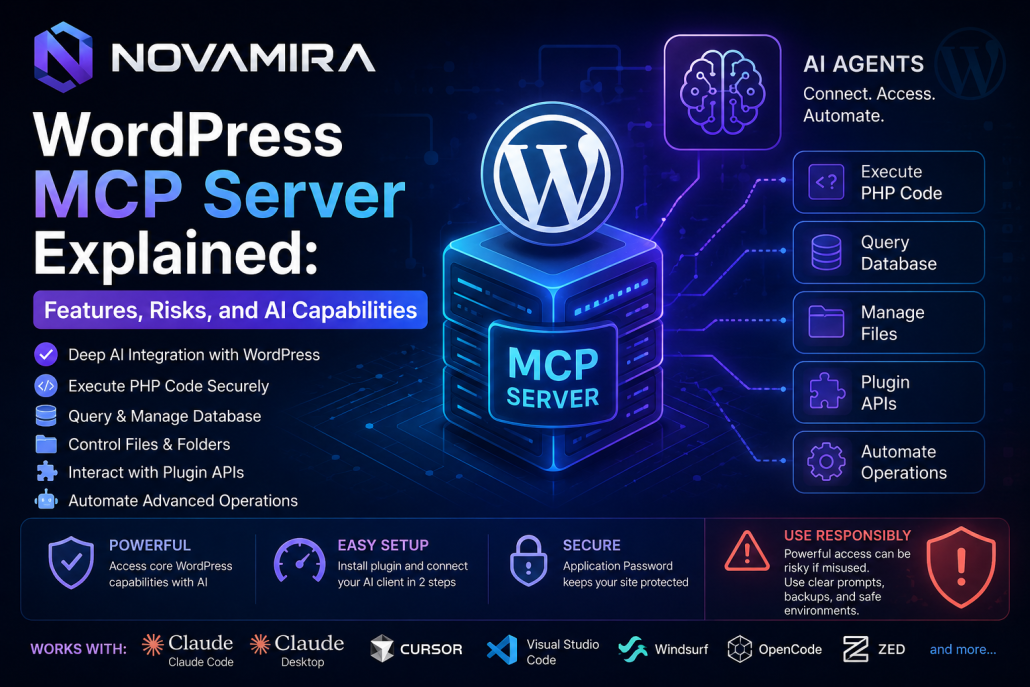
Novamira is a free and open-source WordPress MCP server developed
by the Dynamic.ooo team to create a deep connection between
artificial intelligence and WordPress websites. It allows AI agents to
directly access the WordPress environment, execute PHP code, manage
databases, control files, interact with plugin APIs, and automate
advanced website operations through modern AI clients.
Unlike many WordPress MCP servers that provide only limited
predefined tools, Novamira offers a far more flexible and powerful
architecture. Instead of restricting AI to a few fixed functions, it gives
AI access to the core capabilities of WordPress itself. Because
Novamira can securely execute PHP code inside WordPress, AI agents
can perform almost anything that WordPress can do. Developers can
also create custom AI abilities, intelligent workflows, and advanced
automation systems on top of the platform. This creates a highly
flexible environment for backend development, website management,
content automation, and AI-powered operations.
One of Novamira’s biggest advantages is its fast and simple
installation process. Setup only requires two steps. First, the Novamira
plugin is installed on the WordPress website. Then, the preferred AI
client is connected using the MCP configuration automatically
generated inside the WordPress dashboard. Novamira supports Claude
Code, Claude Desktop, Cursor, Visual Studio Code, Windsurf,
OpenCode, Zed, and many other MCP-compatible AI clients.
After installation, WordPress generates a secure Application Password
that allows authenticated communication between the AI client and the
WordPress environment. This password must remain private because it
provides direct access to website operations and AI automation
features.
Inside the WordPress dashboard, Novamira automatically generates the
commands required for MCP integration. Connecting AI clients such
as Claude Desktop or Cursor simply involves copying the generated
configuration into the MCP Server settings of the selected client. Once
the configuration is saved and the client is restarted, WordPress
becomes available as an active MCP server directly inside the AI
environment.
After enabling the “AI Abilities” option, Novamira unlocks advanced
AI-powered capabilities for the website. AI agents can automate
workflows, manage backend operations, interact with plugins, and
dynamically extend website functionality using PHP execution and
custom automation logic.
However, the same deep access that makes Novamira powerful can
also make it risky if used carelessly. Because AI agents can execute
PHP code and interact directly with WordPress internals, they may
unintentionally modify files, change plugin settings, edit PHP
functions, or perform actions that the website owner does not want.
Poorly written prompts or unrestricted permissions may cause
unwanted modifications inside the WordPress environment.
For this reason, users should always provide clear and controlled
instructions to AI agents. It is highly recommended to use backups,
staging environments, restricted permissions, and careful supervision
before enabling advanced AI automation on live production websites.
Novamira represents a major step forward in AI-
powered WordPress development by combining open-
source flexibility, MCP compatibility, deep WordPress
integration, and intelligent automation into a single
platform.