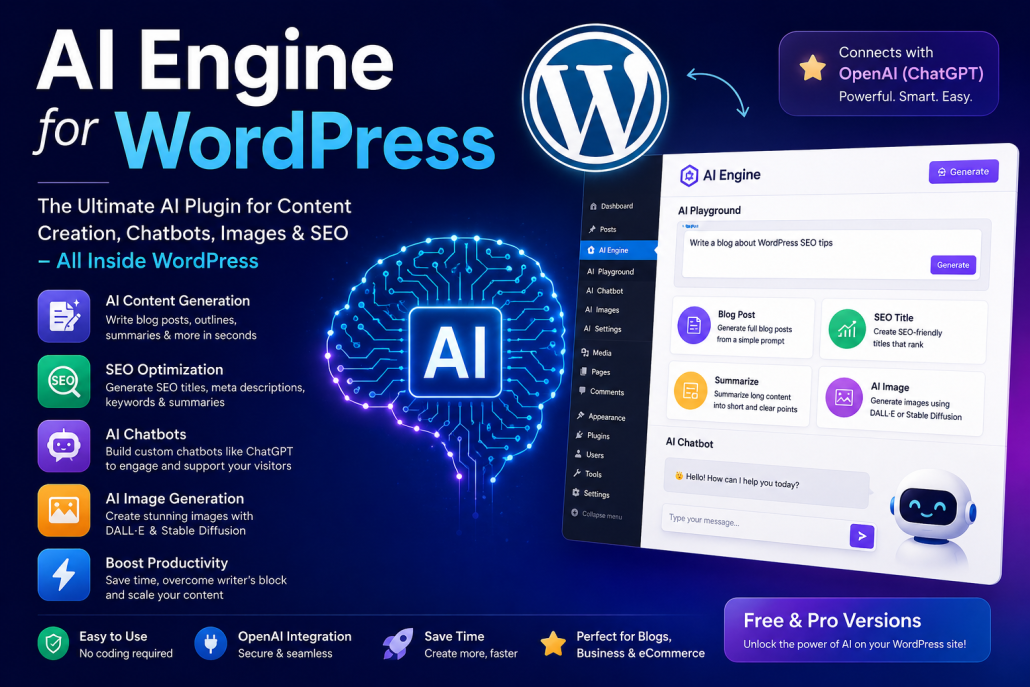
AI Engine for WordPress
What if your WordPress website could automatically
write blog posts, generate AI images, create SEO titles,
summarize articles, and even chat with your visitors
like ChatGPT? Thanks to modern artificial intelligence
tools, this is now possible directly inside WordPress.
One of the most powerful plugins currently available
for this purpose is AI Engine, a feature-rich WordPress
AI plugin developed by Jordi Meow. This plugin
connects your website to OpenAI, the same technology
behind ChatGPT, and allows website owners,
bloggers, developers, and businesses to integrate
advanced AI tools into their WordPress dashboard
without complicated coding.
AI Engine is designed to make content creation and website
management faster, easier, and more efficient. After installing the
plugin from the WordPress plugin directory, you simply connect it to
your OpenAI API key. Once connected, your website gains access to a
wide range of AI-powered capabilities. For example, if you are writing
a technology blog, you can type a short prompt such as “Write an
article about WordPress SEO tips for beginners,” and AI Engine will
generate a complete article draft within seconds. This is extremely
useful for bloggers who regularly publish content and need help
overcoming writer’s block or generating new ideas quickly.
Another powerful feature of AI Engine is its AI Playground. This
section allows users to experiment with prompts, create summaries,
generate outlines, brainstorm article ideas, or rewrite content in
different styles. For instance, a digital marketer could ask the AI to
create five catchy SEO-friendly titles for a blog post, while an app
developer could generate a quick tutorial introduction for SwiftUI or
Flutter projects. Instead of spending hours brainstorming, AI Engine
helps accelerate the creative process directly inside WordPress.
One of the most impressive features is the integrated AI chatbot
system. AI Engine allows you to create a custom chatbot similar to
ChatGPT and place it anywhere on your website using a shortcode. For
example, an e-commerce website could use the chatbot to answer
product questions automatically, while a personal blog could use it to
engage visitors and recommend articles. The chatbot can be
customized to match your website’s personality, control response
length, and even limit topics. This makes it useful for customer
support, lead generation, and user engagement.
AI Engine also supports AI image generation using technologies such
as DALL·E and Stable Diffusion. Users can create images directly
inside WordPress by simply typing prompts like “modern minimalist
workspace with AI technology” or “futuristic mobile app interface.”
These generated visuals can be used as blog thumbnails, placeholders,
hero sections, or idea visualizations. Although it does not fully replace
professional design software like Photoshop, it dramatically speeds up
content production for bloggers and creators.
The plugin also includes tools for SEO optimization. Users can
generate SEO-friendly titles, meta descriptions, keywords, and
summaries directly from the editor. For example, if you publish articles
about MongoDB, AI Engine can automatically create optimized
headlines such as “MongoDB Indexing Explained for Beginners” or
“How MongoDB Improves Database Performance.” This helps
improve search engine visibility while saving time.
The Pro version of AI Engine unlocks even more advanced features,
including memory-based chatbots, prompt templates, AI assistants
trained on your own content, and deeper customization options. For
businesses and professional websites, these advanced capabilities can
significantly improve productivity and automation.
Overall, AI Engine is one of the most complete and
lightweight AI plugins available for WordPress today.
It combines AI content writing, chatbot systems, image
generation, and SEO tools into a single platform.
Whether you run a blog, a business website, an e-
commerce store, or a technology platform, AI Engine
provides a practical and modern way to integrate
artificial intelligence directly into your WordPress workflow.